
使用时间旅行(Time travel)
在 LangGraph 中重放过去的执行并派生分支以探索替代路径
概览
LangGraph 通过检查点支持时间旅行:
- 重放(Replay):从先前的检查点重试。
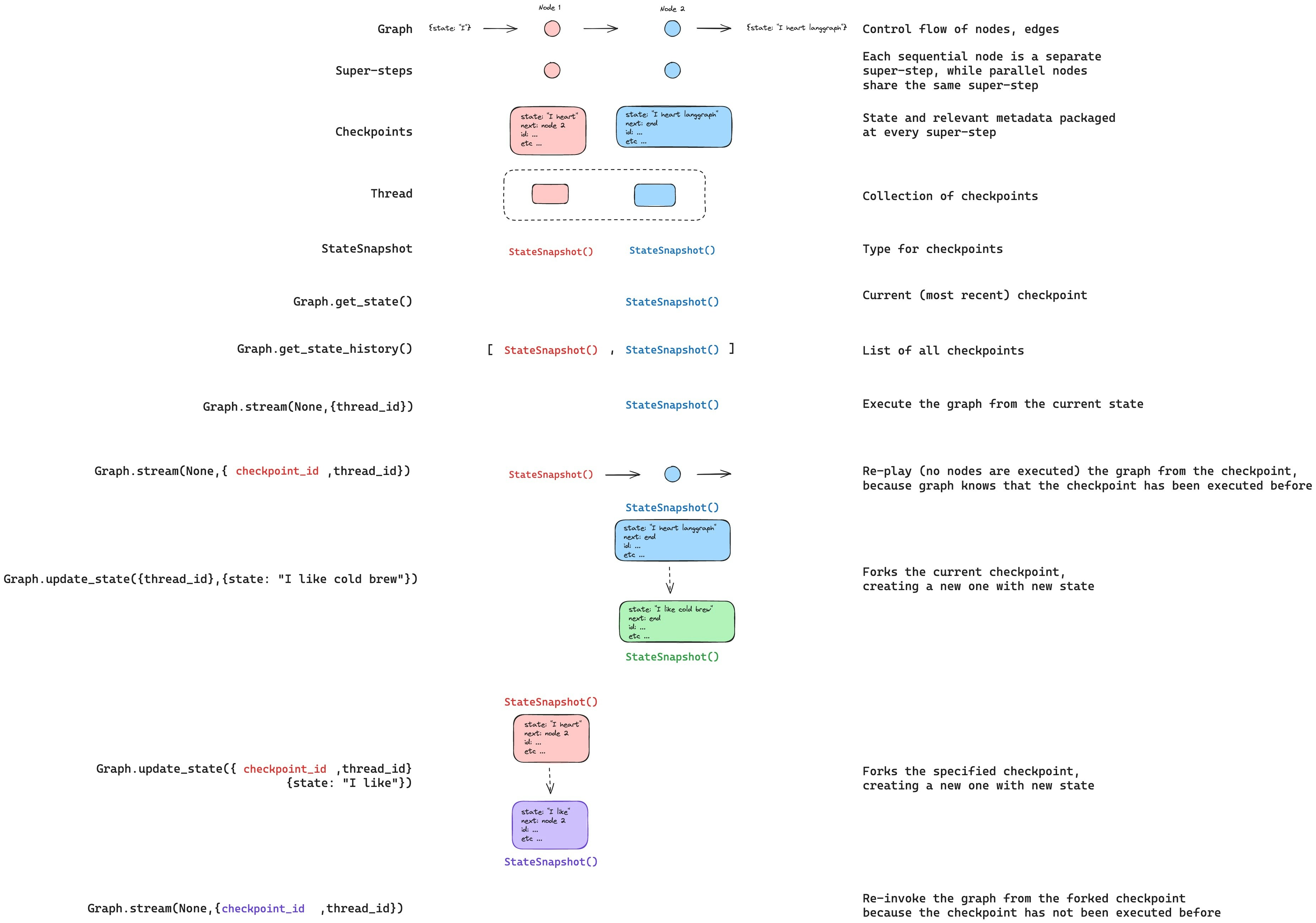
- 分支派生(Fork):在修改状态后从先前的检查点派生出分支,以探索替代路径。
两者都是通过从先前的检查点恢复来工作的。检查点之前的节点不会重新执行(其结果已保存)。检查点之后的节点会重新执行,包括任何 LLM 调用、API 请求和中断(这些可能会产生不同的结果)。
重放(Replay)
使用先前检查点的配置调用图以从该点重放。
WARNING
重放会重新执行节点——它不仅仅是从缓存中读取。LLM 调用、API 请求和中断会再次触发,并可能返回不同的结果。从最终检查点(没有 next 节点)重放是一个空操作(no-op)。
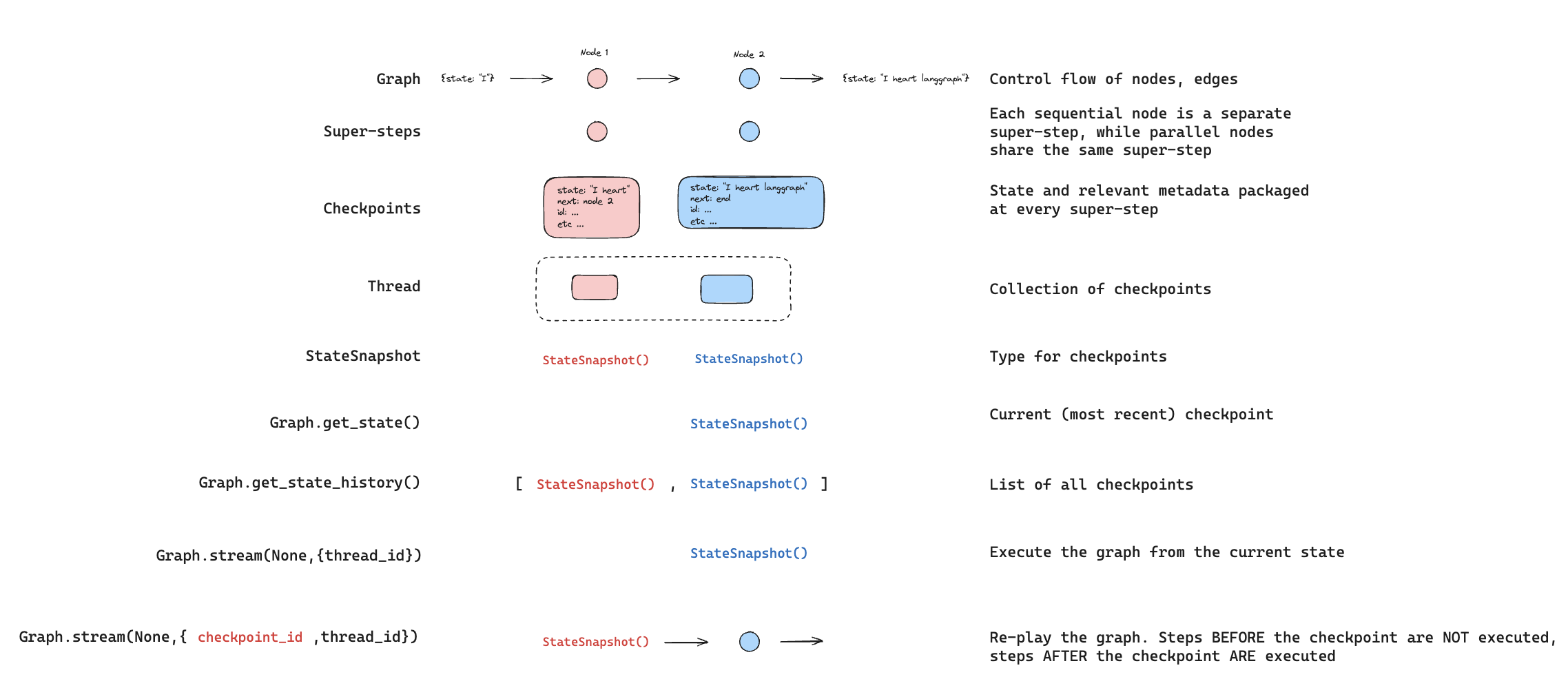
使用 getStateHistory 查找要从中重放的检查点,然后使用该检查点的配置调用 invoke:
import { v7 as uuid7 } from "uuid";
import { StateGraph, MemorySaver, START, Annotation } from "@langchain/langgraph";

const StateAnnotation = Annotation.Root({
  topic: Annotation<string>(),
  joke: Annotation<string>(),
});

function generateTopic(state: typeof StateAnnotation.State) {
  return { topic: "socks in the dryer" };
}

function writeJoke(state: typeof StateAnnotation.State) {
  return { joke: `Why do ${state.topic} disappear? They elope!` };
}

const checkpointer = new MemorySaver();
const graph = new StateGraph(StateAnnotation)
  .addNode("generateTopic", generateTopic)
  .addNode("writeJoke", writeJoke)
  .addEdge(START, "generateTopic")
  .addEdge("generateTopic", "writeJoke")
  .compile({ checkpointer });

// 步骤 1:运行图
const config = { configurable: { thread_id: uuid7() } };
const result = await graph.invoke({}, config);

// 步骤 2:查找用于重放的检查点
const states = [];
for await (const state of graph.getStateHistory(config)) {
  states.push(state);
}

// 步骤 3:从特定检查点重放
const beforeJoke = states.find((s) => s.next.includes("writeJoke"));
const replayResult = await graph.invoke(null, beforeJoke.config);
// writeJoke 重新执行(再次运行),generateTopic 不会重新运行
分支派生(Fork)
Fork 从过去的检查点创建一个修改了状态的新分支。在先前的检查点上调用 update_state 创建派生分支,然后传递 null 调用 invoke 继续执行。
WARNING
update_state 不会回滚线程。它会创建一个从指定点分支出来的新检查点。原始执行历史记录保持完整。
// 查找在 writeJoke 之前的检查点
const states = [];
for await (const state of graph.getStateHistory(config)) {
  states.push(state);
}
const beforeJoke = states.find((s) => s.next.includes("writeJoke"));

// 派生:更新状态以修改主题
const forkConfig = await graph.updateState(
  beforeJoke.config,
  { topic: "chickens" },
);

// 从派生分支恢复 — writeJoke 使用新主题重新执行
const forkResult = await graph.invoke(null, forkConfig);
console.log(forkResult.joke); // 关于小鸡的笑话,而不是袜子
从特定节点派生
调用 update_state 时,值将使用指定节点的写入器(包括 reducers)应用。检查点记录该节点产生了更新,执行将从该节点的后续节点恢复。
默认情况下,LangGraph 会从检查点的版本历史记录推断 asNode。从特定检查点派生时,这种推断几乎总是正确的。
在以下情况下显式指定 asNode:
- 并行分支:多个节点在同一步骤中更新了状态,LangGraph 无法确定哪一个是最后一个(
InvalidUpdateError)。 - 无执行历史:在全新线程上设置状态(在测试中很常见)。
- 跳过节点:将
asNode设置为较后的节点,使图认为该节点已经运行。
// 图结构:generateTopic -> writeJoke

// 将此更新视为由 generateTopic 生成。
// 执行在 writeJoke(generateTopic 的后续节点)恢复。
const forkConfig = await graph.updateState(
  beforeJoke.config,
  { topic: "chickens" },
  { asNode: "generateTopic" },
);
中断(Interrupts)
如果你的图将 interrupt 用于人机协同工作流,则在时间旅行期间中断总是会重新触发。包含中断的节点重新执行,并且 interrupt() 暂停等待新的 Command({ resume: ... })。
import { interrupt, Command } from "@langchain/langgraph";

function askHuman(state: { value: string[] }) {
  const answer = interrupt("What is your name?");
  return { value: [`Hello, ${answer}!`] };
}

function finalStep(state: { value: string[] }) {
  return { value: ["Done"] };
}

// ... 使用检查点保存器构建图 ...

// 首次运行:命中断点
await graph.invoke({ value: [] }, config);
// 携带答案恢复
await graph.invoke(new Command({ resume: "Alice" }), config);

// 从 askHuman 之前重放
const states = [];
for await (const state of graph.getStateHistory(config)) {
  states.push(state);
}
const beforeAsk = states.filter((s) => s.next.includes("askHuman")).pop();

const replayResult = await graph.invoke(null, beforeAsk.config);
// 在中断处暂停 — 等待新的 Command({ resume: ... })

// 从 askHuman 之前派生分支
const forkConfig = await graph.updateState(beforeAsk.config, { value: ["forked"] });
const forkResult = await graph.invoke(null, forkConfig);
// 在中断处暂停 — 等待新的 Command({ resume: ... })

// 使用不同答案恢复派生分支的中断
await graph.invoke(new Command({ resume: "Bob" }), forkConfig);
// 结果:{ value: ["forked", "Hello, Bob!", "Done"] }
多个中断
如果你的图在多个点收集输入(例如多步表单),你可以从各个中断之间派生分支以更改后面的答案,而无需重新询问较早的问题。
// 从两个中断之间派生分支(在 askName 之后,askAge 之前)
const states = [];
for await (const state of graph.getStateHistory(config)) {
  states.push(state);
}
const between = states.filter((s) => s.next.includes("askAge")).pop();

const forkConfig = await graph.updateState(between.config, { value: ["modified"] });
const result = await graph.invoke(null, forkConfig);
// askName 的结果保留 ("name:Alice")
// askAge 在中断处暂停 — 等待新答案
子图(Subgraphs)
带有子图的时间旅行取决于子图是否具有自己的检查点保存器。这决定了你可以从中进行时间旅行的检查点的粒度。
继承检查点保存器(默认)
默认情况下,子图继承父级的检查点保存器。父级将整个子图视为单个超步——对于整个子图执行,只有一个父级检查点。从子图之前进行时间旅行会从头重新执行它。
你不能时间旅行到默认子图中节点之间的点——你只能从父级进行时间旅行。
// 没有自己检查点保存器的子图(默认)
const subgraph = new StateGraph(StateAnnotation)
  .addNode("stepA", stepA)       // 包含 interrupt()
  .addNode("stepB", stepB)       // 包含 interrupt()
  .addEdge(START, "stepA")
  .addEdge("stepA", "stepB")
  .compile();  // 没有检查点保存器 — 继承自父级

const graph = new StateGraph(StateAnnotation)
  .addNode("subgraphNode", subgraph)
  .addEdge(START, "subgraphNode")
  .compile({ checkpointer });

// 完成两个中断
await graph.invoke({ value: [] }, config);
await graph.invoke(new Command({ resume: "Alice" }), config);
await graph.invoke(new Command({ resume: "30" }), config);

// 从子图之前进行时间旅行
const states = [];
for await (const state of graph.getStateHistory(config)) {
  states.push(state);
}
const beforeSub = states.filter((s) => s.next.includes("subgraphNode")).pop();

const forkConfig = await graph.updateState(beforeSub.config, { value: ["forked"] });
const result = await graph.invoke(null, forkConfig);
// 整个子图从头重新执行
// 你无法时间旅行到 stepA 和 stepB 之间的点
子图检查点保存器
在子图上设置 checkpointer: true 以赋予其自己的检查点历史记录。这会在子图内部的每个步骤创建检查点,允许你从子图内部的特定点进行时间旅行——例如在两个中断之间。
使用带有 subgraphs: true 的 getState 访问子图自己的检查点配置,然后从该配置派生分支:
// 带有自己检查点保存器的子图
const subgraph = new StateGraph(StateAnnotation)
  .addNode("stepA", stepA)       // 包含 interrupt()
  .addNode("stepB", stepB)       // 包含 interrupt()
  .addEdge(START, "stepA")
  .addEdge("stepA", "stepB")
  .compile({ checkpointer: true });  // 专属检查点历史记录

const graph = new StateGraph(StateAnnotation)
  .addNode("subgraphNode", subgraph)
  .addEdge(START, "subgraphNode")
  .compile({ checkpointer });

// 运行直到 stepA 中断,然后恢复 -> 命中 stepB 中断
await graph.invoke({ value: [] }, config);
await graph.invoke(new Command({ resume: "Alice" }), config);

// 获取子图自己的检查点(位于 stepA 和 stepB 之间)
const parentState = await graph.getState(config, { subgraphs: true });
const subConfig = parentState.tasks[0].state.config;

// 从子图检查点派生分支
const forkConfig = await graph.updateState(subConfig, { value: ["forked"] });
const result = await graph.invoke(null, forkConfig);
// stepB 重新执行,stepA 的结果被保留有关配置子图检查点保存器的更多信息,请参阅子图持久化。