
智能体中的上下文工程 (Context engineering)
概述
构建智能体(或任何 LLM 应用程序)的难点在于让它们足够可靠。虽然它们在原型阶段可能行之有效,但在真实世界的用例中往往会失败。
为什么智能体会失败?
当智能体发生失败时,通常是因为智能体内部的 LLM 调用采取了错误的行动 / 没有按我们的预期行事。LLM 的失败通常归结于以下两个原因之一:
- 底层 LLM 能力不足
- 没有向 LLM 传递“正确”的上下文
大多数情况下——实际上正是第二个原因导致了智能体不可靠。
上下文工程 (Context engineering) 是指以正确的格式提供正确的信息和工具,以便 LLM 能够完成任务。这是 AI 工程师的头号工作。缺乏“正确”的上下文是阻碍智能体变得更加可靠的头号障碍,而 LangChain 的智能体抽象经过专门设计,旨在为上下文工程提供便利。
TIP
刚刚接触上下文工程?请从概念概述开始,了解不同类型的上下文以及何时使用它们。
智能体循环
一个典型的智能体循环包含两个主要步骤:
- 模型调用 (Model call) - 使用提示词和可用工具调用 LLM,返回响应或执行工具的请求
- 工具执行 (Tool execution) - 执行 LLM 请求的工具,返回工具结果
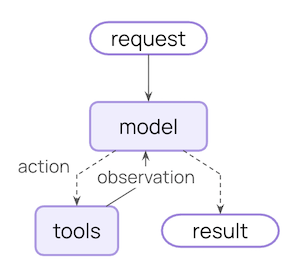
该循环持续进行,直到 LLM 决定结束。
你可以控制什么
为了构建可靠的智能体,你需要控制智能体循环中每个步骤发生的事情,以及步骤之间发生的事情。
| 上下文类型 | 你所控制的内容 | 瞬态还是持久 |
|---|---|---|
| 模型上下文 | 进入模型调用的内容(指令、消息历史、工具、响应格式) | 瞬态 (Transient) |
| 工具上下文 | 工具可以访问和产出的内容(对状态、存储、运行时上下文的读取/写入) | 持久 (Persistent) |
| 生命周期上下文 | 模型调用与工具调用之间发生的事情(摘要、安全护栏、日志记录等) | 持久 (Persistent) |
瞬态上下文 (Transient context)
LLM 在单次调用中所看到的内容。你可以修改消息、工具或提示词,而无需更改状态中保存的内容。
持久上下文 (Persistent context)
跨轮次保存在状态中的内容。生命周期钩子和工具写入会对其进行永久修改。
数据源
在整个过程中,你的智能体访问(读取 / 写入)不同的数据源:
| 数据源 | 别名 | 作用域 | 示例 |
|---|---|---|---|
| 运行时上下文 (Runtime Context) | 静态配置 | 会话作用域 (Conversation-scoped) | 用户 ID、API 密钥、数据库连接、权限、环境设置 |
| 状态 (State) | 短期记忆 | 会话作用域 (Conversation-scoped) | 当前消息、上传的文件、身份验证状态、工具结果 |
| 存储 (Store) | 长期记忆 | 跨会话 (Cross-conversation) | 用户偏好、提取的洞察、记忆、历史数据 |
工作原理
LangChain 中间件是底层机制,它让使用 LangChain 的开发者能够切实落地上下文工程。
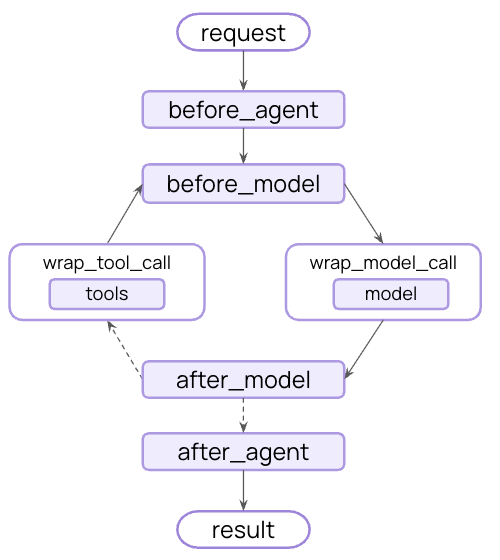
中间件允许你接入智能体生命周期的任意步骤,并且能够:
- 更新上下文
- 跳转到智能体生命周期的不同步骤
在整个指南中,你将看到频繁使用中间件 API 作为实现上下文工程目标的手段。
模型上下文
控制进入每次模型调用的内容——指令、可用工具、使用哪个模型以及输出格式。这些决策直接影响可靠性和成本。
开发者向 LLM 提供的基础指令。
发送给 LLM 的完整消息列表(对话历史)。
智能体可用于采取行动的实用工具。
要调用的实际模型(包括配置)。
模型最终响应的 Schema 规范。
所有这些类型的模型上下文都可以从状态 (state)(短期记忆)、存储 (store)(长期记忆)或运行时上下文 (runtime context)(静态配置)中获取。
系统提示词
系统提示词设定了 LLM 的行为和能力。不同的用户、上下文或对话阶段需要不同的指令。成功的智能体会利用记忆、偏好和配置,为当前的对话状态提供正确的指令。
状态 (State)
从状态中访问消息计数或对话上下文:
import { createAgent } from "langchain";

const agent = createAgent({
  model: "gpt-5.5",
  tools: [...],
  middleware: [
    dynamicSystemPromptMiddleware((state) => {
      // 从 State 读取:检查对话长度
      const messageCount = state.messages.length;

      let base = "You are a helpful assistant.";

      if (messageCount > 10) {
        base += "\nThis is a long conversation - be extra concise.";
      }

      return base;
    }),
  ],
});
存储 (Store)
从长期记忆中访问用户偏好:
import * as z from "zod";
import { createAgent, dynamicSystemPromptMiddleware } from "langchain";

const contextSchema = z.object({
  userId: z.string(),
});

type Context = z.infer<typeof contextSchema>;

const agent = createAgent({
  model: "gpt-5.5",
  tools: [...],
  contextSchema,
  middleware: [
    dynamicSystemPromptMiddleware<Context>(async (state, runtime) => {
      const userId = runtime.context.userId;

      // 从 Store 读取:获取用户偏好
      const store = runtime.store;
      const userPrefs = await store.get(["preferences"], userId);

      let base = "You are a helpful assistant.";

      if (userPrefs) {
        const style = userPrefs.value?.communicationStyle || "balanced";
        base += `\nUser prefers ${style} responses.`;
      }

      return base;
    }),
  ],
});
运行时上下文 (Runtime Context)
从运行时上下文中访问用户 ID 或配置:
import * as z from "zod";
import { createAgent, dynamicSystemPromptMiddleware } from "langchain";

const contextSchema = z.object({
  userRole: z.string(),
  deploymentEnv: z.string(),
});

type Context = z.infer<typeof contextSchema>;

const agent = createAgent({
  model: "gpt-5.5",
  tools: [...],
  contextSchema,
  middleware: [
    dynamicSystemPromptMiddleware<Context>((state, runtime) => {
      // 从运行时上下文读取:用户角色与环境
      const userRole = runtime.context.userRole;
      const env = runtime.context.deploymentEnv;

      let base = "You are a helpful assistant.";

      if (userRole === "admin") {
        base += "\nYou have admin access. You can perform all operations.";
      } else if (userRole === "viewer") {
        base += "\nYou have read-only access. Guide users to read operations only.";
      }

      if (env === "production") {
        base += "\nBe extra careful with any data modifications.";
      }

      return base;
    }),
  ],
});
消息
消息构成了发送给 LLM 的提示词。 管理消息内容至关重要,以确保 LLM 拥有能够妥善响应的正确信息。
状态 (State)
当与当前查询相关时,从 State 注入已上传文件的上下文:
import { createMiddleware, HumanMessage } from "langchain";

const injectFileContext = createMiddleware({
  name: "InjectFileContext",
  wrapModelCall: (request, handler) => {
    // request.state 是 request.state.messages 的简写
    const uploadedFiles = request.state.uploadedFiles || [];

    if (uploadedFiles.length > 0) {
      // 构建关于可用文件的上下文
      const fileDescriptions = uploadedFiles.map(file =>
        `- ${file.name} (${file.type}): ${file.summary}`
      );

      const fileContext = `Files you have access to in this conversation:
${fileDescriptions.join("\n")}

Reference these files when answering questions.`;

      // 在最近的消息前注入文件上下文
      const messages = [
        ...request.messages,  // 会话的其余部分
        new HumanMessage(fileContext)
      ];
      request = { ...request, messages };
    }

    return handler(request);
  },
});

const agent = createAgent({
  model: "gpt-5.5",
  tools: [...],
  middleware: [injectFileContext],
});
存储 (Store)
从 Store 注入用户的电子邮件撰写风格,以指导起草:
import * as z from "zod";
import { createMiddleware, HumanMessage } from "langchain";

const contextSchema = z.object({
  userId: z.string(),
});

const injectWritingStyle = createMiddleware({
  name: "InjectWritingStyle",
  contextSchema,
  wrapModelCall: async (request, handler) => {
    const userId = request.runtime.context.userId;

    // 从 Store 读取:获取用户的写作风格示例
    const store = request.runtime.store;
    const writingStyle = await store.get(["writing_style"], userId);

    if (writingStyle) {
      const style = writingStyle.value;
      // 根据存储的示例构建风格指南
      const styleContext = `Your writing style:
- Tone: ${style.tone || 'professional'}
- Typical greeting: "${style.greeting || 'Hi'}"
- Typical sign-off: "${style.signOff || 'Best'}"
- Example email you've written:
${style.exampleEmail || ''}`;

      // 追加到末尾——模型对最后的消息关注度更高
      const messages = [
        ...request.messages,
        new HumanMessage(styleContext)
      ];
      request = { ...request, messages };
    }

    return handler(request);
  },
});
运行时上下文 (Runtime Context)
根据用户所在的司法管辖区,从运行时上下文中注入合规规则:
import * as z from "zod";
import { createMiddleware, HumanMessage } from "langchain";

const contextSchema = z.object({
  userJurisdiction: z.string(),
  industry: z.string(),
  complianceFrameworks: z.array(z.string()),
});

type Context = z.infer<typeof contextSchema>;

const injectComplianceRules = createMiddleware<Context>({
  name: "InjectComplianceRules",
  contextSchema,
  wrapModelCall: (request, handler) => {
    // 从运行时上下文读取:获取合规要求
    const { userJurisdiction, industry, complianceFrameworks } = request.runtime.context;

    // 构建合规约束
    const rules = [];
    if (complianceFrameworks.includes("GDPR")) {
      rules.push("- Must obtain explicit consent before processing personal data");
      rules.push("- Users have right to data deletion");
    }
    if (complianceFrameworks.includes("HIPAA")) {
      rules.push("- Cannot share patient health information without authorization");
      rules.push("- Must use secure, encrypted communication");
    }
    if (industry === "finance") {
      rules.push("- Cannot provide financial advice without proper disclaimers");
    }

    if (rules.length > 0) {
      const complianceContext = `Compliance requirements for ${userJurisdiction}:
${rules.join("\n")}`;

      // 追加到末尾——模型对最后的消息关注度更高
      const messages = [
        ...request.messages,
        new HumanMessage(complianceContext)
      ];
      request = { ...request, messages };
    }

    return handler(request);
  },
});
NOTE
瞬态与持久消息更新 (Transient vs Persistent Message Updates):
上面的示例使用 wrap_model_call 进行瞬态更新——仅修改单次调用中发送给模型的消息,而不会改变保存在状态中的内容。
对于修改状态的持久更新,你可以:
- 直接从
wrapModelCall返回一个Command,从模型调用层注入状态更新。 - 使用生命周期钩子(如
beforeModel、afterModel)或wrapToolCall(用于工具返回结果)来更新对话历史。有关更多详细信息,请参阅中间件文档。
有关更多信息,请参阅状态更新。
工具
工具让模型能够与数据库、API 和外部系统交互。你如何定义和选择工具,会直接影响模型能否有效地完成任务。
定义工具
每个工具都需要清晰的名称、描述、参数名称和参数描述。这些不仅仅是元数据——它们还会引导模型思考何时以及如何使用该工具。
import { tool } from "@langchain/core/tools";
import { z } from "zod";

const searchOrders = tool(
  async ({ userId, status, limit }) => {
    // 此处编写具体实现
  },
  {
    name: "search_orders",
    description: `Search for user orders by status.

    Use this when the user asks about order history or wants to check
    order status. Always filter by the provided status.`,
    schema: z.object({
      userId: z.string().describe("Unique identifier for the user"),
      status: z.enum(["pending", "shipped", "delivered"]).describe("Order status to filter by"),
      limit: z.number().default(10).describe("Maximum number of results to return"),
    }),
  }
);
选择工具
并非每个工具都适用于所有情况。工具过多可能会让模型不堪重负(上下文过载)并增加错误;工具过少又会限制能力。动态工具选择可以根据身份验证状态、用户权限、特性标志(feature flags)或对话阶段来动态调整可用工具集。
状态 (State)
仅在达到特定对话里程碑后才启用高级工具:
import { createMiddleware } from "langchain";

const stateBasedTools = createMiddleware({
  name: "StateBasedTools",
  wrapModelCall: (request, handler) => {
    // 从 State 读取:检查身份验证与对话长度
    const state = request.state;
    const isAuthenticated = state.authenticated || false;
    const messageCount = state.messages.length;

    let filteredTools = request.tools;

    // 仅在身份验证后启用敏感工具
    if (!isAuthenticated) {
      filteredTools = request.tools.filter(t => t.name.startsWith("public_"));
    } else if (messageCount < 5) {
      filteredTools = request.tools.filter(t => t.name !== "advanced_search");
    }

    return handler({ ...request, tools: filteredTools });
  },
});
存储 (Store)
根据 Store 中的用户偏好或特性标志过滤工具:
import * as z from "zod";
import { createMiddleware } from "langchain";

const contextSchema = z.object({
  userId: z.string(),
});

const storeBasedTools = createMiddleware({
  name: "StoreBasedTools",
  contextSchema,
  wrapModelCall: async (request, handler) => {
    const userId = request.runtime.context.userId;

    // 从 Store 读取:获取用户启用的功能特性
    const store = request.runtime.store;
    const featureFlags = await store.get(["features"], userId);

    let filteredTools = request.tools;

    if (featureFlags) {
      const enabledFeatures = featureFlags.value?.enabledTools || [];
      filteredTools = request.tools.filter(t => enabledFeatures.includes(t.name));
    }

    return handler({ ...request, tools: filteredTools });
  },
});
运行时上下文 (Runtime Context)
根据运行时上下文中的用户权限过滤工具:
import * as z from "zod";
import { createMiddleware } from "langchain";

const contextSchema = z.object({
  userRole: z.string(),
});

const contextBasedTools = createMiddleware({
  name: "ContextBasedTools",
  contextSchema,
  wrapModelCall: (request, handler) => {
    // 从运行时上下文读取:获取用户角色
    const userRole = request.runtime.context.userRole;

    let filteredTools = request.tools;

    if (userRole === "admin") {
      // 管理员获得所有工具
    } else if (userRole === "editor") {
      filteredTools = request.tools.filter(t => t.name !== "delete_data");
    } else {
      filteredTools = request.tools.filter(t => t.name.startsWith("read_"));
    }

    return handler({ ...request, tools: filteredTools });
  },
});
有关过滤预注册工具以及在运行时注册工具(例如来自 MCP 服务器)的详细信息,请参阅动态工具。
模型
不同的模型具有不同的优势、成本和上下文窗口。为手头的任务选择合适的模型,这一选择在智能体运行期间可能会发生变化。
状态 (State)
根据 State 中的对话长度使用不同的模型:
import { createMiddleware, initChatModel } from "langchain";

// 在中间件外部初始化模型一次
const largeModel = initChatModel("claude-sonnet-4-6");
const standardModel = initChatModel("gpt-5.5");
const efficientModel = initChatModel("gpt-5.4-mini");

const stateBasedModel = createMiddleware({
  name: "StateBasedModel",
  wrapModelCall: (request, handler) => {
    // request.messages 是 request.state.messages 的简写
    const messageCount = request.messages.length;
    let model;

    if (messageCount > 20) {
      model = largeModel;
    } else if (messageCount > 10) {
      model = standardModel;
    } else {
      model = efficientModel;
    }

    return handler({ ...request, model });
  },
});
存储 (Store)
从 Store 中使用用户偏好的模型:
import * as z from "zod";
import { createMiddleware, initChatModel } from "langchain";

const contextSchema = z.object({
  userId: z.string(),
});

// 初始化可用模型一次
const MODEL_MAP = {
  "gpt-5.5": initChatModel("gpt-5.5"),
  "gpt-5.4-mini": initChatModel("gpt-5.4-mini"),
  "claude-sonnet": initChatModel("claude-sonnet-4-6"),
};

const storeBasedModel = createMiddleware({
  name: "StoreBasedModel",
  contextSchema,
  wrapModelCall: async (request, handler) => {
    const userId = request.runtime.context.userId;

    // 从 Store 读取:获取用户偏好的模型
    const store = request.runtime.store;
    const userPrefs = await store.get(["preferences"], userId);

    let model = request.model;

    if (userPrefs) {
      const preferredModel = userPrefs.value?.preferredModel;
      if (preferredModel && MODEL_MAP[preferredModel]) {
        model = MODEL_MAP[preferredModel];
      }
    }

    return handler({ ...request, model });
  },
});
运行时上下文 (Runtime Context)
根据运行时上下文中的成本层级或环境选择模型:
import * as z from "zod";
import { createMiddleware, initChatModel } from "langchain";

const contextSchema = z.object({
  costTier: z.string(),
  environment: z.string(),
});

// 在中间件外部初始化模型一次
const premiumModel = initChatModel("claude-sonnet-4-6");
const standardModel = initChatModel("gpt-5.5");
const budgetModel = initChatModel("gpt-5.4-mini");

const contextBasedModel = createMiddleware({
  name: "ContextBasedModel",
  contextSchema,
  wrapModelCall: (request, handler) => {
    // 从运行时上下文读取:成本层级和环境
    const costTier = request.runtime.context.costTier;
    const environment = request.runtime.context.environment;

    let model;

    if (environment === "production" && costTier === "premium") {
      model = premiumModel;
    } else if (costTier === "budget") {
      model = budgetModel;
    } else {
      model = standardModel;
    }

    return handler({ ...request, model });
  },
});有关更多示例,请参阅动态模型。
响应格式
结构化输出将非结构化文本转换为经过校验的结构化数据。当提取特定字段或向后端系统返回数据时,自由格式文本往往是不够用的。
工作原理: 当你提供一个 Schema 作为响应格式时,模型的最终响应将保证符合该 Schema。智能体会持续运行模型 / 工具调用循环,直到模型完成工具调用,然后将最终响应强制转换(coerce)为所提供的格式。
定义格式
Schema 定义引导着模型。字段名称、类型和描述明确规定了输出应遵循的精确格式。
import { z } from "zod";

const customerSupportTicket = z.object({
  category: z.enum(["billing", "technical", "account", "product"]).describe(
    "Issue category"
  ),
  priority: z.enum(["low", "medium", "high", "critical"]).describe(
    "Urgency level"
  ),
  summary: z.string().describe(
    "One-sentence summary of the customer's issue"
  ),
  customerSentiment: z.enum(["frustrated", "neutral", "satisfied"]).describe(
    "Customer's emotional tone"
  ),
}).describe("Structured ticket information extracted from customer message");
选择格式
动态响应格式选择可以根据用户偏好、对话阶段或角色自适应调整 Schema——在初期返回简单格式,随着复杂度增加返回详细格式。
状态 (State)
根据对话状态配置结构化输出:
import { createMiddleware } from "langchain";
import { z } from "zod";

const simpleResponse = z.object({
  answer: z.string().describe("A brief answer"),
});

const detailedResponse = z.object({
  answer: z.string().describe("A detailed answer"),
  reasoning: z.string().describe("Explanation of reasoning"),
  confidence: z.number().describe("Confidence score 0-1"),
});

const stateBasedOutput = createMiddleware({
  name: "StateBasedOutput",
  wrapModelCall: (request, handler) => {
    // request.state 是 request.state.messages 的简写
    const messageCount = request.messages.length;

    let responseFormat;
    if (messageCount < 3) {
      // 对话初期 - 使用简单格式
      responseFormat = simpleResponse;
    } else {
      // 深入对话 - 使用详细格式
      responseFormat = detailedResponse;
    }

    return handler({ ...request, responseFormat });
  },
});
存储 (Store)
根据 Store 中的用户偏好配置输出格式:
import * as z from "zod";
import { createMiddleware } from "langchain";

const contextSchema = z.object({
  userId: z.string(),
});

const verboseResponse = z.object({
  answer: z.string().describe("Detailed answer"),
  sources: z.array(z.string()).describe("Sources used"),
});

const conciseResponse = z.object({
  answer: z.string().describe("Brief answer"),
});

const storeBasedOutput = createMiddleware({
  name: "StoreBasedOutput",
  wrapModelCall: async (request, handler) => {
    const userId = request.runtime.context.userId;

    // 从 Store 读取:获取用户偏好的响应风格
    const store = request.runtime.store;
    const userPrefs = await store.get(["preferences"], userId);

    const style = userPrefs?.value?.responseStyle || "concise";
    const responseFormat =
      style === "verbose" ? verboseResponse : conciseResponse;

    return handler({
      ...request,
      responseFormat,
    });
  },
});
运行时上下文 (Runtime Context)
根据运行时上下文(如用户角色或环境)配置输出格式:
import * as z from "zod";
import { createMiddleware } from "langchain";

const contextSchema = z.object({
  userRole: z.string(),
  environment: z.string(),
});

const adminResponse = z.object({
  answer: z.string().describe("Answer"),
  debugInfo: z.record(z.any()).describe("Debug information"),
  systemStatus: z.string().describe("System status"),
});

const userResponse = z.object({
  answer: z.string().describe("Answer"),
});

const contextBasedOutput = createMiddleware({
  name: "ContextBasedOutput",
  wrapModelCall: (request, handler) => {
    // 从运行时上下文读取:用户角色与环境
    const userRole = request.runtime.context.userRole;
    const environment = request.runtime.context.environment;

    let responseFormat;
    if (userRole === "admin" && environment === "production") {
      responseFormat = adminResponse;
    } else {
      responseFormat = userResponse;
    }

    return handler({ ...request, responseFormat });
  },
});
工具上下文 (Tool context)
工具的特殊之处在于它们既能读取上下文,也能写入上下文。
在最基础的情况下,当工具执行时,它接收 LLM 的请求参数并返回一条工具消息(tool message)。工具完成其工作并生成结果。
工具还可以为模型获取重要信息,使其能够执行并完成任务。
读取 (Reads)
大多数真实场景中的工具不仅需要 LLM 的参数。它们还需要用于数据库查询的用户 ID、用于外部服务的 API 密钥,或者用于做出决策的当前会话状态。工具从 state、store 和运行时上下文(runtime context)中读取这些信息以进行访问。
State
从 State 中读取以检查当前会话信息:
import * as z from "zod";
import { createAgent, tool, type ToolRuntime } from "langchain";

const checkAuthentication = tool(
  async (_, runtime: ToolRuntime) => {
    // 从 State 中读取:检查当前认证状态
    const currentState = runtime.state;
    const isAuthenticated = currentState.authenticated || false;

    if (isAuthenticated) {
      return "User is authenticated";
    } else {
      return "User is not authenticated";
    }
  },
  {
    name: "check_authentication",
    description: "Check if user is authenticated",
    schema: z.object({}),
  }
);
Store
从 Store 中读取以访问持久化的用户偏好设置:
import * as z from "zod";
import { createAgent, tool, type ToolRuntime } from "langchain";

const contextSchema = z.object({
  userId: z.string(),
});

const getPreference = tool(
  async ({ preferenceKey }, runtime: ToolRuntime) => {
    const userId = runtime.context.userId;

    // 从 Store 中读取:获取现有的偏好设置
    const store = runtime.store;
    const existingPrefs = await store.get(["preferences"], userId);

    if (existingPrefs) {
      const value = existingPrefs.value?.[preferenceKey];
      return value ? `${preferenceKey}: ${value}` : `No preference set for ${preferenceKey}`;
    } else {
      return "No preferences found";
    }
  },
  {
    name: "get_preference",
    description: "Get user preference from Store",
    schema: z.object({
      preferenceKey: z.string(),
    }),
  }
);
Runtime Context
从运行时上下文(Runtime Context)中读取 API 密钥和用户 ID 等配置:
import * as z from "zod";
import { tool } from "@langchain/core/tools";
import { createAgent } from "langchain";

const contextSchema = z.object({
  userId: z.string(),
  apiKey: z.string(),
  dbConnection: z.string(),
});

const fetchUserData = tool(
  async ({ query }, runtime: ToolRuntime<any, typeof contextSchema>) => {
    // 从 Runtime Context 中读取:获取 API 密钥和数据库连接
    const { userId, apiKey, dbConnection } = runtime.context;

    // 使用配置获取数据
    const results = await performDatabaseQuery(dbConnection, query, apiKey);

    return `Found ${results.length} results for user ${userId}`;
  },
  {
    name: "fetch_user_data",
    description: "Fetch data using Runtime Context configuration",
    schema: z.object({
      query: z.string(),
    }),
  }
);

const agent = createAgent({
  model: "gpt-5.5",
  tools: [fetchUserData],
  contextSchema,
});
写入 (Writes)
工具的结果可用于帮助智能体完成给定的任务。工具既可以直接向模型返回结果,也可以更新智能体的记忆,从而使重要的上下文在后续步骤中可用。
State
使用 Command 写入 State 以跟踪会话特定信息:
import * as z from "zod";
import { tool } from "@langchain/core/tools";
import { createAgent } from "langchain";
import { Command } from "@langchain/langgraph";

const authenticateUser = tool(
  async ({ password }) => {
    // 执行认证
    if (password === "correct") {
      // 写入 State:使用 Command 标记为已认证
      return new Command({
        update: { authenticated: true },
      });
    } else {
      return new Command({ update: { authenticated: false } });
    }
  },
  {
    name: "authenticate_user",
    description: "Authenticate user and update State",
    schema: z.object({
      password: z.string(),
    }),
  }
);
Store
写入 Store 以跨会话持久化数据:
import * as z from "zod";
import { createAgent, tool, type ToolRuntime } from "langchain";

const savePreference = tool(
  async ({ preferenceKey, preferenceValue }, runtime: ToolRuntime<any, typeof contextSchema>) => {
    const userId = runtime.context.userId;

    // 读取现有的偏好设置
    const store = runtime.store;
    const existingPrefs = await store.get(["preferences"], userId);

    // 与新偏好设置合并
    const prefs = existingPrefs?.value || {};
    prefs[preferenceKey] = preferenceValue;

    // 写入 Store:保存更新后的偏好设置
    await store.put(["preferences"], userId, prefs);

    return `Saved preference: ${preferenceKey} = ${preferenceValue}`;
  },
  {
    name: "save_preference",
    description: "Save user preference to Store",
    schema: z.object({
      preferenceKey: z.string(),
      preferenceValue: z.string(),
    }),
  }
);
有关在工具中访问 state、store 和运行时上下文的完整示例,请参见 Tools。
生命周期上下文 (Life-cycle context)
控制核心智能体步骤之间所发生的事情 —— 拦截数据流以实现摘要、护栏(guardrails)和日志记录等横切关注点。
正如你在模型上下文和工具上下文中所见,中间件是使上下文工程切实可行的机制。中间件允许你挂钩到智能体生命周期中的任何步骤,并执行以下操作之一:
- 更新上下文 (Update context) - 修改 state 和 store 以持久化变更、更新对话历史记录或保存洞察信息
- 在生命周期中跳转 (Jump in the lifecycle) - 根据上下文移动到智能体周期中的不同步骤(例如,如果满足条件则跳过工具执行,或者使用修改后的上下文重复模型调用)
示例:摘要 (Example: Summarization)
最常见的生命周期模式之一是在对话历史过长时自动进行压缩。与模型上下文中展示的临时消息修剪不同,摘要会持久化更新状态 (persistently updates state) —— 永久地将旧消息替换为一条摘要,并保存以供所有后续轮次使用。
LangChain 为此提供了内置中间件:
import { createAgent, summarizationMiddleware } from "langchain";

const agent = createAgent({
  model: "gpt-5.5",
  tools: [...],
  middleware: [
    summarizationMiddleware({
      model: "gpt-5.4-mini",
      trigger: { tokens: 4000 },
      keep: { messages: 20 },
    }),
  ],
});
当对话超出 Token 限制时,SummarizationMiddleware 会自动:
- 使用单独的 LLM 调用对较旧的消息进行摘要总结
- 在 State 中将它们替换为一条摘要消息(永久替换)
- 保持最近的消息完整以保留上下文
被摘要总结后的对话历史记录将被永久更新 —— 后续轮次将看到摘要而不是原始消息。
NOTE
有关内置中间件的完整列表、可用钩子以及如何创建自定义中间件的信息,请参阅中间件文档。
最佳实践 (Best practices)
- 从简单开始 (Start simple) - 从静态提示词和工具开始,仅在需要时才添加动态特性
- 增量测试 (Test incrementally) - 一次只添加一个上下文工程功能
- 监控性能 (Monitor performance) - 跟踪模型调用次数、Token 使用量和延迟
- 使用内置中间件 (Use built-in middleware) - 充分利用
SummarizationMiddleware、LLMToolSelectorMiddleware等 - 记录你的上下文策略 (Document your context strategy) - 明确传递了什么上下文以及为什么要传递
- 理解临时与持久 (Understand transient vs persistent):模型上下文的变更是临时的(单次调用生效),而生命周期上下文的变更是持久化到状态中的
相关资源 (Related resources)
- 上下文概念概述 (Context conceptual overview) - 了解上下文类型及其使用时机
- 中间件 (Middleware) - 完整的中间件指南
- 工具 (Tools) - 工具创建与上下文访问
- 记忆 (Memory) - 短期与长期记忆模式
- 智能体 (Agents) - 核心智能体概念