
子智能体体系 (Subagents)
创建具有独立上下文和专用工具的自主子智能体
子智能体是运行在隔离上下文窗口中的短暂智能体实例。主协调器智能体使用内置的 task 工具衍生子智能体,由子智能体自主执行繁重、多步骤的专业任务,并仅向主智能体返回一份最终结果。
为什么使用子智能体?
在单智能体循环中,每一个中间工具调用的原始输出都会直接追加到对话历史中。面对复杂任务,这会导致两大痛点:
- 上下文过度膨胀 (Context Bloat):Token 消耗呈指数级上升,迅速突破大模型的有效窗口或引发极高的 API 账单。
- 上下文污染与干扰:长篇累牍的中间错误和低级数据会稀释主模型的注意力,导致最终决策失焦。
子智能体提供了解耦之道:
- 上下文完全隔离:子智能体在干净的上下文空间中工作,数十次工具调用的内部细节不会泄露到主会话中。
- 专业模型选型:可以为主协调器选用强推理模型(如 Claude Opus / GPT-5.5),而为海量代码检索子任务配置更便宜、速度更快的轻量模型(如 Gemini Flash)。
- 单次最终交接:子智能体执行完毕后返回一份浓缩精要的总结报告,主智能体只接收最终结论。
核心配置与开箱即用
默认通用子智能体 (Default subagent)
Deep Agents 默认自动搭载了一个通用的 general-purpose 子智能体,无需手动配置任何子智能体列表即可直接响应复杂的委派需求。
在不使用子智能体的情况下运行
如果业务用例不需要任何子智能体派发,可在创建智能体时通过 excluded_tools: ["task"] 显式移除 task 工具。
自定义子智能体类型
有两种方式定义子智能体:
1. 基于配置字典的 SubAgent(推荐)
以声明式的普通对象配置子智能体,由框架自动进行懒加载编译:
name:子智能体唯一英文名称标识符(如researcher、code-reviewer)。description:核心用途说明,协调器根据该描述自主判断何时委派给它。systemPrompt:指导子智能体专注特定任务的系统提示词。tools:专属于该子智能体的工具集合。model(可选):覆盖主智能体模型,指定该子智能体专用的模型。
2. 已编译的 CompiledSubAgent
传入一个已经编译完成的完整 LangGraph 图或 LangChain 智能体实例,适用于高度定制化、具备私有复杂内部拓扑图的子流程。
graph TB
    Main[Main Agent] --> |task tool| Sub[Subagent]

    Sub --> Research[Research]
    Sub --> Code[Code]
    Sub --> General[General]

    Research --> |isolated work| Result[Final Result]
    Code --> |isolated work| Result
    General --> |isolated work| Result

    Result --> Main
使用声明式 SubAgent 示例
以下示例展示了如何配置一个专用的研究员子智能体:
import { tool } from "langchain";
import { TavilySearch } from "@langchain/tavily";
import { createDeepAgent, type SubAgent } from "deepagents";
import { z } from "zod";

const internetSearch = tool(
  async ({
    query,
    maxResults = 5,
    topic = "general",
    includeRawContent = false,
  }: {
    query: string;
    maxResults?: number;
    topic?: "general" | "news" | "finance";
    includeRawContent?: boolean;
  }) => {
    const tavilySearch = new TavilySearch({
      maxResults,
      tavilyApiKey: process.env.TAVILY_API_KEY,
      includeRawContent,
      topic,
    });
    return await tavilySearch._call({ query });
  },
  {
    name: "internet_search",
    description: "Run a web search",
    schema: z.object({
      query: z.string().describe("The search query"),
      maxResults: z.number().optional().default(5),
      topic: z
        .enum(["general", "news", "finance"])
        .optional()
        .default("general"),
      includeRawContent: z.boolean().optional().default(false),
    }),
  },
);

const researchSubagent: SubAgent = {
  name: "research-agent",
  description: "Used to research more in depth questions",
  systemPrompt: "You are a great researcher",
  tools: [internetSearch],
  model: "google:gemini-3.6-flash", // Optional override, defaults to main agent model
};
const subagents = [researchSubagent];

const agent = createDeepAgent({
  model: "google:gemini-3.6-flash",
  subagents,
});
使用 CompiledSubAgent 示例
当子智能体内部本身是一个复杂的确定性状态图时,可使用编译后的子图:
import { tool } from "langchain";
import { TavilySearch } from "@langchain/tavily";
import { createDeepAgent, type SubAgent } from "deepagents";
import { z } from "zod";

const internetSearch = tool(
  async ({
    query,
    maxResults = 5,
    topic = "general",
    includeRawContent = false,
  }: {
    query: string;
    maxResults?: number;
    topic?: "general" | "news" | "finance";
    includeRawContent?: boolean;
  }) => {
    const tavilySearch = new TavilySearch({
      maxResults,
      tavilyApiKey: process.env.TAVILY_API_KEY,
      includeRawContent,
      topic,
    });
    return await tavilySearch._call({ query });
  },
  {
    name: "internet_search",
    description: "Run a web search",
    schema: z.object({
      query: z.string().describe("The search query"),
      maxResults: z.number().optional().default(5),
      topic: z
        .enum(["general", "news", "finance"])
        .optional()
        .default("general"),
      includeRawContent: z.boolean().optional().default(false),
    }),
  },
);

const researchSubagent: SubAgent = {
  name: "research-agent",
  description: "Used to research more in depth questions",
  systemPrompt: "You are a great researcher",
  tools: [internetSearch],
  model: "openai:gpt-5.5", // Optional override, defaults to main agent model
};
const subagents = [researchSubagent];

const agent = createDeepAgent({
  model: "google:gemini-3.6-flash",
  subagents,
});
分叉式子智能体 (Forked subagents)
默认情况下,子智能体在完全纯净、空白的上下文环境中启动(mode: "isolated")。 在某些场景下,子智能体需要充分了解此前的完整对话历史与背景细节,此时可配置 mode: "fork":
配置分叉子智能体
设置 mode: "fork" 后,子智能体在启动时会自动继承父智能体迄今为止的全部对话历史,但其执行过程中的新动作依然保持隔离,不会反向污染父级上下文。
何时使用分叉模式?
- 需要深入理解用户在前几轮交互中提出的隐式偏好时。
- 代码重构或上下文延续分析任务。
import { tool } from "langchain";
import { TavilySearch } from "@langchain/tavily";
import { createDeepAgent, type SubAgent } from "deepagents";
import { z } from "zod";

const internetSearch = tool(
  async ({
    query,
    maxResults = 5,
    topic = "general",
    includeRawContent = false,
  }: {
    query: string;
    maxResults?: number;
    topic?: "general" | "news" | "finance";
    includeRawContent?: boolean;
  }) => {
    const tavilySearch = new TavilySearch({
      maxResults,
      tavilyApiKey: process.env.TAVILY_API_KEY,
      includeRawContent,
      topic,
    });
    return await tavilySearch._call({ query });
  },
  {
    name: "internet_search",
    description: "Run a web search",
    schema: z.object({
      query: z.string().describe("The search query"),
      maxResults: z.number().optional().default(5),
      topic: z
        .enum(["general", "news", "finance"])
        .optional()
        .default("general"),
      includeRawContent: z.boolean().optional().default(false),
    }),
  },
);

const researchSubagent: SubAgent = {
  name: "research-agent",
  description: "Used to research more in depth questions",
  systemPrompt: "You are a great researcher",
  tools: [internetSearch],
  model: "anthropic:claude-sonnet-5", // Optional override, defaults to main agent model
};
const subagents = [researchSubagent];

const agent = createDeepAgent({
  model: "google:gemini-3.6-flash",
  subagents,
});
动态子智能体 (Dynamic subagents)
与代码解释器结合使用时,智能体可以在 JavaScript 循环中并发派发几十个子智能体: 详情请参阅专门的动态子智能体深度指南。
import { tool } from "langchain";
import { TavilySearch } from "@langchain/tavily";
import { createDeepAgent, type SubAgent } from "deepagents";
import { z } from "zod";

const internetSearch = tool(
  async ({
    query,
    maxResults = 5,
    topic = "general",
    includeRawContent = false,
  }: {
    query: string;
    maxResults?: number;
    topic?: "general" | "news" | "finance";
    includeRawContent?: boolean;
  }) => {
    const tavilySearch = new TavilySearch({
      maxResults,
      tavilyApiKey: process.env.TAVILY_API_KEY,
      includeRawContent,
      topic,
    });
    return await tavilySearch._call({ query });
  },
  {
    name: "internet_search",
    description: "Run a web search",
    schema: z.object({
      query: z.string().describe("The search query"),
      maxResults: z.number().optional().default(5),
      topic: z
        .enum(["general", "news", "finance"])
        .optional()
        .default("general"),
      includeRawContent: z.boolean().optional().default(false),
    }),
  },
);

const researchSubagent: SubAgent = {
  name: "research-agent",
  description: "Used to research more in depth questions",
  systemPrompt: "You are a great researcher",
  tools: [internetSearch],
  model: "openrouter:z-ai/glm-5.2", // Optional override, defaults to main agent model
};
const subagents = [researchSubagent];

const agent = createDeepAgent({
  model: "google:gemini-3.6-flash",
  subagents,
});
流式传输与链路追踪
在流式输出中,你可以使用 stream.subagents 实时捕获每个子任务的执行进度与生成内容。 在 LangSmith 监控大盘中,子智能体的调用会自动作为树状父子跨度(Span)进行嵌套展示,支持按子智能体名称进行专项过滤分析。
结构化输出支持
子智能体同样支持返回结构化数据(如 JSON Schema 校验的对象),方便协调器以编程方式稳定消费结果。
通用子智能体调优 (General-purpose subagent)
你可以通过提供商配置文件(Profile)对默认的通用子智能体进行微调,例如注入自定义系统指令后缀或覆盖其基础人设。
编写高效子智能体的最佳实践
- 编写精准清晰的
description:主智能体完全依赖该描述决定是否派发任务。描述必须具体说明“在什么任务场景下应调用该子智能体”。 - 系统提示词应直奔主题:明确告知子智能体的职责边界、交付物格式以及何时停止。
- 最小化工具集合:只给子智能体分配完成其任务所绝对必需的工具,减少大模型的选择困扰。
- 按任务特征挑选最优模型:简单搜索用低成本快速模型,高难度逻辑推理用强模型。
- 要求返回精炼总结:在提示词中明确要求子智能体提供高度精炼的事实汇报,杜绝冗余套话。
常见排错指南 (Troubleshooting)
- 子智能体从未被调用:通常是因为主智能体的工具列表或系统提示词没有明确指引,或者子智能体的
description过于含糊。 - 选错了子智能体:检查是否有多个子智能体的描述存在重叠或歧义,重新界定各自的分工边界。
import { tool } from "langchain";
import { TavilySearch } from "@langchain/tavily";
import { createDeepAgent, type SubAgent } from "deepagents";
import { z } from "zod";

const internetSearch = tool(
  async ({
    query,
    maxResults = 5,
    topic = "general",
    includeRawContent = false,
  }: {
    query: string;
    maxResults?: number;
    topic?: "general" | "news" | "finance";
    includeRawContent?: boolean;
  }) => {
    const tavilySearch = new TavilySearch({
      maxResults,
      tavilyApiKey: process.env.TAVILY_API_KEY,
      includeRawContent,
      topic,
    });
    return await tavilySearch._call({ query });
  },
  {
    name: "internet_search",
    description: "Run a web search",
    schema: z.object({
      query: z.string().describe("The search query"),
      maxResults: z.number().optional().default(5),
      topic: z
        .enum(["general", "news", "finance"])
        .optional()
        .default("general"),
      includeRawContent: z.boolean().optional().default(false),
    }),
  },
);

const researchSubagent: SubAgent = {
  name: "research-agent",
  description: "Used to research more in depth questions",
  systemPrompt: "You are a great researcher",
  tools: [internetSearch],
  model: "fireworks:accounts/fireworks/models/glm-5p2", // Optional override, defaults to main agent model
};
const subagents = [researchSubagent];

const agent = createDeepAgent({
  model: "google:gemini-3.6-flash",
  subagents,
});import { tool } from "langchain";
import { TavilySearch } from "@langchain/tavily";
import { createDeepAgent, type SubAgent } from "deepagents";
import { z } from "zod";
const internetSearch = tool(
async ({
query,
maxResults = 5,
topic = "general",
includeRawContent = false,
}: {
query: string;
maxResults?: number;
topic?: "general" | "news" | "finance";
includeRawContent?: boolean;
}) => {
const tavilySearch = new TavilySearch({
maxResults,
tavilyApiKey: process.env.TAVILY_API_KEY,
includeRawContent,
topic,
});
return await tavilySearch._call({ query });
},
{
name: "internet_search",
description: "Run a web search",
schema: z.object({
query: z.string().describe("The search query"),
maxResults: z.number().optional().default(5),
topic: z
.enum(["general", "news", "finance"])
.optional()
.default("general"),
includeRawContent: z.boolean().optional().default(false),
}),
},
);
const researchSubagent: SubAgent = {
name: "research-agent",
description: "Used to research more in depth questions",
systemPrompt: "You are a great researcher",
tools: [internetSearch],
model: "baseten:zai-org/GLM-5.2", // Optional override, defaults to main agent model
};
const subagents = [researchSubagent];
const agent = createDeepAgent({
model: "google:gemini-3.6-flash",
subagents,
});import { tool } from "langchain";
import { TavilySearch } from "@langchain/tavily";
import { createDeepAgent, type SubAgent } from "deepagents";
import { z } from "zod";
const internetSearch = tool(
async ({
query,
maxResults = 5,
topic = "general",
includeRawContent = false,
}: {
query: string;
maxResults?: number;
topic?: "general" | "news" | "finance";
includeRawContent?: boolean;
}) => {
const tavilySearch = new TavilySearch({
maxResults,
tavilyApiKey: process.env.TAVILY_API_KEY,
includeRawContent,
topic,
});
return await tavilySearch._call({ query });
},
{
name: "internet_search",
description: "Run a web search",
schema: z.object({
query: z.string().describe("The search query"),
maxResults: z.number().optional().default(5),
topic: z
.enum(["general", "news", "finance"])
.optional()
.default("general"),
includeRawContent: z.boolean().optional().default(false),
}),
},
);
const researchSubagent: SubAgent = {
name: "research-agent",
description: "Used to research more in depth questions",
systemPrompt: "You are a great researcher",
tools: [internetSearch],
model: "ollama:north-mini-code-1.0", // Optional override, defaults to main agent model
};
const subagents = [researchSubagent];
const agent = createDeepAgent({
model: "google:gemini-3.6-flash",
subagents,
});Using CompiledSubAgent
For more complex use cases, you can provide your custom subagents with CompiledSubAgent. You can create a custom subagent using LangChain's create_agent or by making a custom LangGraph graph using the graph API.
If you're creating a custom LangGraph graph, make sure that the graph has a state key called "messages":
import { CompiledSubAgent, createDeepAgent } from "deepagents";
import { createAgent } from "langchain";
import { tool } from "langchain";
import { z } from "zod";

const internetSearch = tool(
  async ({ query }: { query: string }) => `search results for ${query}`,
  {
    name: "internet_search",
    description: "Run a web search",
    schema: z.object({ query: z.string() }),
  },
);

const researchInstructions = "You are a research coordinator.";
const yourModel = "google:gemini-3.6-flash";
const specializedTools: never[] = [];

// Create a custom agent graph
const customGraph = createAgent({
  model: yourModel,
  tools: specializedTools,
  prompt: "You are a specialized agent for data analysis...",
});

// Use it as a custom subagent
const customSubagent: CompiledSubAgent = {
  name: "data-analyzer",
  description: "Specialized agent for complex data analysis tasks",
  runnable: customGraph,
};

const subagents = [customSubagent];

const agent = createDeepAgent({
  model: "google:gemini-3.6-flash",
  tools: [internetSearch],
  systemPrompt: researchInstructions,
  subagents: subagents,
});import { CompiledSubAgent, createDeepAgent } from "deepagents";
import { createAgent } from "langchain";
import { tool } from "langchain";
import { z } from "zod";
const internetSearch = tool(
async ({ query }: { query: string }) => `search results for ${query}`,
{
name: "internet_search",
description: "Run a web search",
schema: z.object({ query: z.string() }),
},
);
const researchInstructions = "You are a research coordinator.";
const yourModel = "google:gemini-3.6-flash";
const specializedTools: never[] = [];
// Create a custom agent graph
const customGraph = createAgent({
model: yourModel,
tools: specializedTools,
prompt: "You are a specialized agent for data analysis...",
});
// Use it as a custom subagent
const customSubagent: CompiledSubAgent = {
name: "data-analyzer",
description: "Specialized agent for complex data analysis tasks",
runnable: customGraph,
};
const subagents = [customSubagent];
const agent = createDeepAgent({
model: "openai:gpt-5.5",
tools: [internetSearch],
systemPrompt: researchInstructions,
subagents: subagents,
});import { CompiledSubAgent, createDeepAgent } from "deepagents";
import { createAgent } from "langchain";
import { tool } from "langchain";
import { z } from "zod";
const internetSearch = tool(
async ({ query }: { query: string }) => `search results for ${query}`,
{
name: "internet_search",
description: "Run a web search",
schema: z.object({ query: z.string() }),
},
);
const researchInstructions = "You are a research coordinator.";
const yourModel = "google:gemini-3.6-flash";
const specializedTools: never[] = [];
// Create a custom agent graph
const customGraph = createAgent({
model: yourModel,
tools: specializedTools,
prompt: "You are a specialized agent for data analysis...",
});
// Use it as a custom subagent
const customSubagent: CompiledSubAgent = {
name: "data-analyzer",
description: "Specialized agent for complex data analysis tasks",
runnable: customGraph,
};
const subagents = [customSubagent];
const agent = createDeepAgent({
model: "anthropic:claude-sonnet-5",
tools: [internetSearch],
systemPrompt: researchInstructions,
subagents: subagents,
});import { CompiledSubAgent, createDeepAgent } from "deepagents";
import { createAgent } from "langchain";
import { tool } from "langchain";
import { z } from "zod";
const internetSearch = tool(
async ({ query }: { query: string }) => `search results for ${query}`,
{
name: "internet_search",
description: "Run a web search",
schema: z.object({ query: z.string() }),
},
);
const researchInstructions = "You are a research coordinator.";
const yourModel = "google:gemini-3.6-flash";
const specializedTools: never[] = [];
// Create a custom agent graph
const customGraph = createAgent({
model: yourModel,
tools: specializedTools,
prompt: "You are a specialized agent for data analysis...",
});
// Use it as a custom subagent
const customSubagent: CompiledSubAgent = {
name: "data-analyzer",
description: "Specialized agent for complex data analysis tasks",
runnable: customGraph,
};
const subagents = [customSubagent];
const agent = createDeepAgent({
model: "openrouter:z-ai/glm-5.2",
tools: [internetSearch],
systemPrompt: researchInstructions,
subagents: subagents,
});import { CompiledSubAgent, createDeepAgent } from "deepagents";
import { createAgent } from "langchain";
import { tool } from "langchain";
import { z } from "zod";
const internetSearch = tool(
async ({ query }: { query: string }) => `search results for ${query}`,
{
name: "internet_search",
description: "Run a web search",
schema: z.object({ query: z.string() }),
},
);
const researchInstructions = "You are a research coordinator.";
const yourModel = "google:gemini-3.6-flash";
const specializedTools: never[] = [];
// Create a custom agent graph
const customGraph = createAgent({
model: yourModel,
tools: specializedTools,
prompt: "You are a specialized agent for data analysis...",
});
// Use it as a custom subagent
const customSubagent: CompiledSubAgent = {
name: "data-analyzer",
description: "Specialized agent for complex data analysis tasks",
runnable: customGraph,
};
const subagents = [customSubagent];
const agent = createDeepAgent({
model: "fireworks:accounts/fireworks/models/glm-5p2",
tools: [internetSearch],
systemPrompt: researchInstructions,
subagents: subagents,
});import { CompiledSubAgent, createDeepAgent } from "deepagents";
import { createAgent } from "langchain";
import { tool } from "langchain";
import { z } from "zod";
const internetSearch = tool(
async ({ query }: { query: string }) => `search results for ${query}`,
{
name: "internet_search",
description: "Run a web search",
schema: z.object({ query: z.string() }),
},
);
const researchInstructions = "You are a research coordinator.";
const yourModel = "google:gemini-3.6-flash";
const specializedTools: never[] = [];
// Create a custom agent graph
const customGraph = createAgent({
model: yourModel,
tools: specializedTools,
prompt: "You are a specialized agent for data analysis...",
});
// Use it as a custom subagent
const customSubagent: CompiledSubAgent = {
name: "data-analyzer",
description: "Specialized agent for complex data analysis tasks",
runnable: customGraph,
};
const subagents = [customSubagent];
const agent = createDeepAgent({
model: "baseten:zai-org/GLM-5.2",
tools: [internetSearch],
systemPrompt: researchInstructions,
subagents: subagents,
});import { CompiledSubAgent, createDeepAgent } from "deepagents";
import { createAgent } from "langchain";
import { tool } from "langchain";
import { z } from "zod";
const internetSearch = tool(
async ({ query }: { query: string }) => `search results for ${query}`,
{
name: "internet_search",
description: "Run a web search",
schema: z.object({ query: z.string() }),
},
);
const researchInstructions = "You are a research coordinator.";
const yourModel = "google:gemini-3.6-flash";
const specializedTools: never[] = [];
// Create a custom agent graph
const customGraph = createAgent({
model: yourModel,
tools: specializedTools,
prompt: "You are a specialized agent for data analysis...",
});
// Use it as a custom subagent
const customSubagent: CompiledSubAgent = {
name: "data-analyzer",
description: "Specialized agent for complex data analysis tasks",
runnable: customGraph,
};
const subagents = [customSubagent];
const agent = createDeepAgent({
model: "ollama:north-mini-code-1.0",
tools: [internetSearch],
systemPrompt: researchInstructions,
subagents: subagents,
});Forked subagents
By default, a subagent runs with mode: "isolated": it sees only the task description you give it and has no memory of the conversation that led up to the delegation. A forked subagent (mode: "fork") inherits the parent's conversation history and state instead.
Use forked subagents when the subagent's task is to continue the work the parent already started, like a worker agent that picks up a fix the parent has already diagnosed, or a subagent that drafts the postmortem for an incident investigation. Since forking is a mode you set on the subagent itself, that's a decision you make when you define it.
%%{init: {"flowchart": {"subGraphTitleMargin": {"top": 12, "bottom": 4}}}}%%
graph TD
    Message["'Review PR #482'"]
    Analysis["Parent already found:<br/>tokens logged in plaintext,<br/>no expiry check on refresh"]
    Delegate["Delegate: draft comments<br/>for the issues found"]
    Message --> Analysis --> Delegate

    subgraph Isolated["`**Isolated subagent**`"]
        IOut["Sees only the task description<br/>starts from nothing, re-reviews the diff"]
    end

    subgraph Forked["`**Forked subagent**`"]
        FOut["Sees parent history + continuation preamble<br/>already knows the issues, writes comments directly"]
    end

    Delegate -->|task description only| Isolated
    Delegate -->|parent history + continuation preamble| Forked

    classDef process fill:#E5F4FF,stroke:#006DDD,stroke-width:2px,color:#030710
    classDef output fill:#F6FFDB,stroke:#6E8900,stroke-width:2px,color:#2E3900
    class Message,Analysis,Delegate process
    class IOut,FOut output
NOTE
Subagent forking requires deepagents>=1.13.3. It is in beta; APIs and behavior may change between releases.
Configure a forked subagent
Set mode: "fork" on a SubAgent (the default is mode: "isolated"). You can configure these SubAgent fields: name, description, tools, model, middleware, interruptOn, permissions, and responseFormat.
The fork inherits the parent's skills; setting skills is not supported.
Leave systemPrompt unset to use the parent's prompt. If set, its instructions are appended to the parent's prompt, shortening the shared prefix available for prompt caching across providers. Consequently, setting a fork-specific system prompt is not recommended unless the fork needs additional instructions.
By default, the fork inherits all tools passed to the parent. Set tools to replace those tools, not add to them. For example, a list containing one tool replaces the inherited list with that one tool. Filesystem and other middleware-provided tools are added separately.
import { createDeepAgent } from "deepagents";
import { tool } from "langchain";
import { z } from "zod";

const readDiff = tool(
  async ({ path }: { path: string }) => `diff for ${path}`,
  {
    name: "read_diff",
    description: "Read a file's diff",
    schema: z.object({ path: z.string() }),
  },
);

const commentWriter = {
  name: "comment-writer",
  description: "Continues an in-progress PR review and drafts review comments",
  mode: "fork" as const,
  tools: [readDiff],
};

const agent = await createDeepAgent({
  model: "anthropic:claude-sonnet-4-6",
  tools: [readDiff],
  subagents: [commentWriter],
});

const result = await agent.invoke({
  messages: [
    {
      role: "user",
      content:
        "Review PR #482 and hand it off to comment-writer to draft comments for the issues found",
    },
  ],
});Open a public LangSmith run for this example.
How it works
A fork does not get a fresh task description. It gets the parent's own conversation, with one change: the trailing call that delegated to it is dropped and replaced with a short preamble marking the messages above as a continuation, not a fresh request. When the fork finishes, its answer comes back as a normal tool result, and the parent picks up right where it left off.
// What the parent has, right before delegating
[
  new HumanMessage("Review the changes in PR #482"),
  new AIMessage({ content: "", tool_calls: [{ name: "read_diff", args: { path: "src/auth/session.py" } }] }),
  new ToolMessage({ content: "- session tokens are logged in plaintext\n- no expiry check on refresh", tool_call_id: "1" }),
  new AIMessage("Found two issues: session tokens are logged in plaintext, and there's no expiry check on refresh."),
  new HumanMessage("Good catch. Draft review comments for those."),
  new AIMessage({ content: "", tool_calls: [{ name: "task", args: { subagentType: "comment-writer", description: "Draft review comments for the two issues found above." } }] }),
]

// What the fork actually sees
[
  new HumanMessage("Review the changes in PR #482"),
  new AIMessage({ content: "", tool_calls: [{ name: "read_diff", args: { path: "src/auth/session.py" } }] }),
  new ToolMessage({ content: "- session tokens are logged in plaintext\n- no expiry check on refresh", tool_call_id: "1" }),
  new AIMessage("Found two issues: session tokens are logged in plaintext, and there's no expiry check on refresh."),
  new HumanMessage("Good catch. Draft review comments for those."),
  new HumanMessage("Continuing as the subagent that was just invoked. Draft review comments for the two issues found above."),
]
A fork can reuse the parent's prompt cache for the matching prefix of their requests. Changing the system prompt, tools, or earlier messages shortens that shared prefix across providers. Leave the fork's configuration unchanged to maximize reuse, though cache hits are not guaranteed.
A CompiledSubAgent supports mode: "fork" too, though it keeps its own system prompt since the graph is already built.
When to use forking
Compare isolated and forked modes along these dimensions:
| Dimension | Isolated (default) | Forked |
|---|---|---|
| Context | Only the task description you pass in | The parent's conversation history and state |
| System prompt and skills | You set them on the subagent | Skills not settable; system prompt is appended to the parent's base prompt (breaks caching, so usually left unset) |
| Calling other subagents | Can use the task tool | Cannot use task; must finish the work itself |
| Best for | Focused work that needs little prior context | Continuing an investigation the parent has already started |
Dynamic subagents
By default, the main agent delegates to subagents through task tool calls (it can issue several in a single turn to run them in parallel). With an interpreter attached, the agent can instead dispatch subagents from code—using loops, branches, and parallel batches to fan work out across many items and synthesize the results programmatically. This is called dynamic subagents.
Reach for dynamic subagents when work spans many independent units (reviewing every file in a directory, triaging a batch of tickets), needs multiple perspectives, or benefits from recursive analysis.
WARNING
Dynamic subagents use the interpreter runtime, which is in beta. APIs and lifecycle behavior may change between releases.
Enable dynamic subagents
Dynamic subagents become available as soon as the agent has both subagents and the interpreter middleware. Install the QuickJS interpreter package, then add CodeInterpreterMiddleware to your agent.
npm install deepagents @langchain/quickjspnpm add deepagents @langchain/quickjsyarn add deepagents @langchain/quickjsimport { createDeepAgent } from "deepagents";
import { createCodeInterpreterMiddleware } from "@langchain/quickjs";
const agent = createDeepAgent({
model: "google:gemini-3.6-flash",
subagents: [{
name: "reviewer",
description: "Reviews code for security issues, citing lines and severity",
systemPrompt: "You are a security-focused code reviewer. Report issues with line numbers and severity.",
}],
middleware: [createCodeInterpreterMiddleware()],
});import { createDeepAgent } from "deepagents";
import { createCodeInterpreterMiddleware } from "@langchain/quickjs";
const agent = createDeepAgent({
model: "openai:gpt-5.5",
subagents: [{
name: "reviewer",
description: "Reviews code for security issues, citing lines and severity",
systemPrompt: "You are a security-focused code reviewer. Report issues with line numbers and severity.",
}],
middleware: [createCodeInterpreterMiddleware()],
});import { createDeepAgent } from "deepagents";
import { createCodeInterpreterMiddleware } from "@langchain/quickjs";
const agent = createDeepAgent({
model: "anthropic:claude-sonnet-5",
subagents: [{
name: "reviewer",
description: "Reviews code for security issues, citing lines and severity",
systemPrompt: "You are a security-focused code reviewer. Report issues with line numbers and severity.",
}],
middleware: [createCodeInterpreterMiddleware()],
});import { createDeepAgent } from "deepagents";
import { createCodeInterpreterMiddleware } from "@langchain/quickjs";
const agent = createDeepAgent({
model: "openrouter:z-ai/glm-5.2",
subagents: [{
name: "reviewer",
description: "Reviews code for security issues, citing lines and severity",
systemPrompt: "You are a security-focused code reviewer. Report issues with line numbers and severity.",
}],
middleware: [createCodeInterpreterMiddleware()],
});import { createDeepAgent } from "deepagents";
import { createCodeInterpreterMiddleware } from "@langchain/quickjs";
const agent = createDeepAgent({
model: "fireworks:accounts/fireworks/models/glm-5p2",
subagents: [{
name: "reviewer",
description: "Reviews code for security issues, citing lines and severity",
systemPrompt: "You are a security-focused code reviewer. Report issues with line numbers and severity.",
}],
middleware: [createCodeInterpreterMiddleware()],
});import { createDeepAgent } from "deepagents";
import { createCodeInterpreterMiddleware } from "@langchain/quickjs";
const agent = createDeepAgent({
model: "baseten:zai-org/GLM-5.2",
subagents: [{
name: "reviewer",
description: "Reviews code for security issues, citing lines and severity",
systemPrompt: "You are a security-focused code reviewer. Report issues with line numbers and severity.",
}],
middleware: [createCodeInterpreterMiddleware()],
});import { createDeepAgent } from "deepagents";
import { createCodeInterpreterMiddleware } from "@langchain/quickjs";
const agent = createDeepAgent({
model: "ollama:north-mini-code-1.0",
subagents: [{
name: "reviewer",
description: "Reviews code for security issues, citing lines and severity",
systemPrompt: "You are a security-focused code reviewer. Report issues with line numbers and severity.",
}],
middleware: [createCodeInterpreterMiddleware()],
});NOTE
Dynamic subagent dispatch is on by default whenever the agent has subagents and the interpreter middleware. Pass createCodeInterpreterMiddleware({ subagents: false }) to require dispatch through the normal task tool path.
Trigger dynamic orchestration
Dynamic dispatch is implicit: the agent decides to fan work out from code based on the shape of the task, not a per-call flag.
TIP
The word "workflow" is a useful trigger. The built-in interpreter system prompt treats a "workflow" as a signal to organize work through the interpreter—dispatching subagents with task() from code. Phrasing a request as a "workflow" is a deliberate lever you can pull to opt into dynamic orchestration: include it when you want the agent to fan work out from code. For a single, direct delegation, phrase the request plainly instead.
For example, phrasing the request as a "workflow" opts into fan-out from code:
const result = await agent.invoke({
  messages: [{ role: "user", content: "Run a workflow that reviews every file in src/routes/ and summarizes the top risks." }],
});
For configuration, advanced orchestration patterns, and safety notes, see Dynamic subagents.
Use with a coding agent
The fastest way to try dynamic subagents is with dcode, the LangChain terminal coding agent built on a Deep Agent. It ships with the code interpreter enabled, so dynamic subagents work out of the box with nothing to wire up.
Install dcode:
curl -LsSf https://langch.in/dcode | bashRun it:
dcodeTo trigger dynamic subagents, ask for a "workflow". Instead of grinding through the work itself or managing fan-out through its native task tool, the agent writes an orchestration script that calls the built-in task() global and runs it in the code interpreter. For example: "Run a workflow to review every file in src/ for SQL injection."
As subagents spawn, dcode shows them live in the dynamic subagents panel, grouped into phases by dispatch.
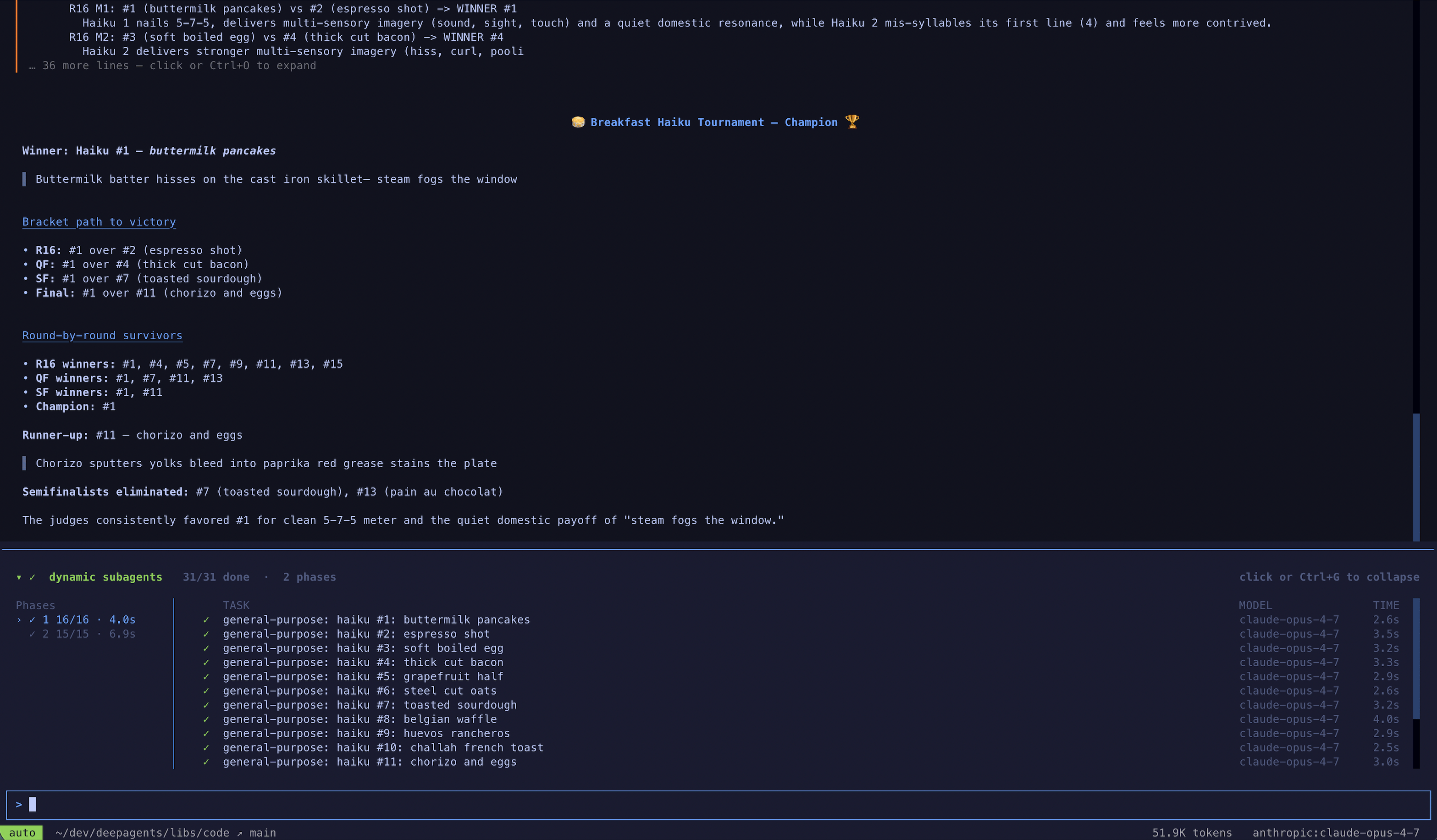
dcode is the fastest way to try this, but you can also use dynamic subagents in the coding agent of your choice over ACP (for example, Zed).
Streaming
Deep Agents support streaming updates from both the coordinator and every delegated subagent.
Use streamEvents to get typed projections—separate iterators for subagents, messages, tool calls, and values—so you can consume each independently.
Stream subagent progress
The simplest pattern is to iterate stream.subagents to track each delegated task as it starts, runs, and completes. Each subagent handle exposes .name, .messages, .tool_calls, and .output.
import { createDeepAgent } from "deepagents";

const agent = createDeepAgent({
  model: "google:gemini-3.6-flash",
  name: "main-agent",
  systemPrompt:
    "You are a project coordinator with no research knowledge. " +
    "For every user request, you must call the task() tool with " +
    "subagent_type set to research-agent. Never answer research " +
    "questions yourself.",
  subagents: [
    {
      name: "research-agent",
      description:
        "Delegate research to this subagent. Give one topic at a time.",
      systemPrompt: "You are a great researcher. Return a brief summary.",
    },
  ],
});

async function streamSubagentProgress() {
  const stream = await agent.streamEvents(
    {
      messages: [
        {
          role: "user",
          content: "Research one recent advance in quantum computing.",
        },
      ],
    },
    { version: "v3" },
  );

  const coordinatorMessages: string[] = [];
  const subagentHandles: { name: string }[] = [];

  await Promise.all([
    (async () => {
      for await (const message of stream.messages) {
        const text = await message.text;
        console.log("[coordinator]", text);
        coordinatorMessages.push(text);
      }
    })(),
    (async () => {
      for await (const subagent of stream.subagents) {
        console.log(`[${subagent.name}] started`);
        subagentHandles.push({ name: subagent.name });
        for await (const message of subagent.messages) {
          console.log(`[${subagent.name}]`, await message.text);
        }
      }
    })(),
    stream.output,
  ]);

  return { coordinatorMessages, subagentHandles };
}import { createDeepAgent } from "deepagents";
const agent = createDeepAgent({
model: "openai:gpt-5.5",
name: "main-agent",
systemPrompt:
"You are a project coordinator with no research knowledge. " +
"For every user request, you must call the task() tool with " +
"subagent_type set to research-agent. Never answer research " +
"questions yourself.",
subagents: [
{
name: "research-agent",
description:
"Delegate research to this subagent. Give one topic at a time.",
systemPrompt: "You are a great researcher. Return a brief summary.",
},
],
});
async function streamSubagentProgress() {
const stream = await agent.streamEvents(
{
messages: [
{
role: "user",
content: "Research one recent advance in quantum computing.",
},
],
},
{ version: "v3" },
);
const coordinatorMessages: string[] = [];
const subagentHandles: { name: string }[] = [];
await Promise.all([
(async () => {
for await (const message of stream.messages) {
const text = await message.text;
console.log("[coordinator]", text);
coordinatorMessages.push(text);
}
})(),
(async () => {
for await (const subagent of stream.subagents) {
console.log(`[${subagent.name}] started`);
subagentHandles.push({ name: subagent.name });
for await (const message of subagent.messages) {
console.log(`[${subagent.name}]`, await message.text);
}
}
})(),
stream.output,
]);
return { coordinatorMessages, subagentHandles };
}import { createDeepAgent } from "deepagents";
const agent = createDeepAgent({
model: "anthropic:claude-sonnet-5",
name: "main-agent",
systemPrompt:
"You are a project coordinator with no research knowledge. " +
"For every user request, you must call the task() tool with " +
"subagent_type set to research-agent. Never answer research " +
"questions yourself.",
subagents: [
{
name: "research-agent",
description:
"Delegate research to this subagent. Give one topic at a time.",
systemPrompt: "You are a great researcher. Return a brief summary.",
},
],
});
async function streamSubagentProgress() {
const stream = await agent.streamEvents(
{
messages: [
{
role: "user",
content: "Research one recent advance in quantum computing.",
},
],
},
{ version: "v3" },
);
const coordinatorMessages: string[] = [];
const subagentHandles: { name: string }[] = [];
await Promise.all([
(async () => {
for await (const message of stream.messages) {
const text = await message.text;
console.log("[coordinator]", text);
coordinatorMessages.push(text);
}
})(),
(async () => {
for await (const subagent of stream.subagents) {
console.log(`[${subagent.name}] started`);
subagentHandles.push({ name: subagent.name });
for await (const message of subagent.messages) {
console.log(`[${subagent.name}]`, await message.text);
}
}
})(),
stream.output,
]);
return { coordinatorMessages, subagentHandles };
}import { createDeepAgent } from "deepagents";
const agent = createDeepAgent({
model: "openrouter:z-ai/glm-5.2",
name: "main-agent",
systemPrompt:
"You are a project coordinator with no research knowledge. " +
"For every user request, you must call the task() tool with " +
"subagent_type set to research-agent. Never answer research " +
"questions yourself.",
subagents: [
{
name: "research-agent",
description:
"Delegate research to this subagent. Give one topic at a time.",
systemPrompt: "You are a great researcher. Return a brief summary.",
},
],
});
async function streamSubagentProgress() {
const stream = await agent.streamEvents(
{
messages: [
{
role: "user",
content: "Research one recent advance in quantum computing.",
},
],
},
{ version: "v3" },
);
const coordinatorMessages: string[] = [];
const subagentHandles: { name: string }[] = [];
await Promise.all([
(async () => {
for await (const message of stream.messages) {
const text = await message.text;
console.log("[coordinator]", text);
coordinatorMessages.push(text);
}
})(),
(async () => {
for await (const subagent of stream.subagents) {
console.log(`[${subagent.name}] started`);
subagentHandles.push({ name: subagent.name });
for await (const message of subagent.messages) {
console.log(`[${subagent.name}]`, await message.text);
}
}
})(),
stream.output,
]);
return { coordinatorMessages, subagentHandles };
}import { createDeepAgent } from "deepagents";
const agent = createDeepAgent({
model: "fireworks:accounts/fireworks/models/glm-5p2",
name: "main-agent",
systemPrompt:
"You are a project coordinator with no research knowledge. " +
"For every user request, you must call the task() tool with " +
"subagent_type set to research-agent. Never answer research " +
"questions yourself.",
subagents: [
{
name: "research-agent",
description:
"Delegate research to this subagent. Give one topic at a time.",
systemPrompt: "You are a great researcher. Return a brief summary.",
},
],
});
async function streamSubagentProgress() {
const stream = await agent.streamEvents(
{
messages: [
{
role: "user",
content: "Research one recent advance in quantum computing.",
},
],
},
{ version: "v3" },
);
const coordinatorMessages: string[] = [];
const subagentHandles: { name: string }[] = [];
await Promise.all([
(async () => {
for await (const message of stream.messages) {
const text = await message.text;
console.log("[coordinator]", text);
coordinatorMessages.push(text);
}
})(),
(async () => {
for await (const subagent of stream.subagents) {
console.log(`[${subagent.name}] started`);
subagentHandles.push({ name: subagent.name });
for await (const message of subagent.messages) {
console.log(`[${subagent.name}]`, await message.text);
}
}
})(),
stream.output,
]);
return { coordinatorMessages, subagentHandles };
}import { createDeepAgent } from "deepagents";
const agent = createDeepAgent({
model: "baseten:zai-org/GLM-5.2",
name: "main-agent",
systemPrompt:
"You are a project coordinator with no research knowledge. " +
"For every user request, you must call the task() tool with " +
"subagent_type set to research-agent. Never answer research " +
"questions yourself.",
subagents: [
{
name: "research-agent",
description:
"Delegate research to this subagent. Give one topic at a time.",
systemPrompt: "You are a great researcher. Return a brief summary.",
},
],
});
async function streamSubagentProgress() {
const stream = await agent.streamEvents(
{
messages: [
{
role: "user",
content: "Research one recent advance in quantum computing.",
},
],
},
{ version: "v3" },
);
const coordinatorMessages: string[] = [];
const subagentHandles: { name: string }[] = [];
await Promise.all([
(async () => {
for await (const message of stream.messages) {
const text = await message.text;
console.log("[coordinator]", text);
coordinatorMessages.push(text);
}
})(),
(async () => {
for await (const subagent of stream.subagents) {
console.log(`[${subagent.name}] started`);
subagentHandles.push({ name: subagent.name });
for await (const message of subagent.messages) {
console.log(`[${subagent.name}]`, await message.text);
}
}
})(),
stream.output,
]);
return { coordinatorMessages, subagentHandles };
}import { createDeepAgent } from "deepagents";
const agent = createDeepAgent({
model: "ollama:north-mini-code-1.0",
name: "main-agent",
systemPrompt:
"You are a project coordinator with no research knowledge. " +
"For every user request, you must call the task() tool with " +
"subagent_type set to research-agent. Never answer research " +
"questions yourself.",
subagents: [
{
name: "research-agent",
description:
"Delegate research to this subagent. Give one topic at a time.",
systemPrompt: "You are a great researcher. Return a brief summary.",
},
],
});
async function streamSubagentProgress() {
const stream = await agent.streamEvents(
{
messages: [
{
role: "user",
content: "Research one recent advance in quantum computing.",
},
],
},
{ version: "v3" },
);
const coordinatorMessages: string[] = [];
const subagentHandles: { name: string }[] = [];
await Promise.all([
(async () => {
for await (const message of stream.messages) {
const text = await message.text;
console.log("[coordinator]", text);
coordinatorMessages.push(text);
}
})(),
(async () => {
for await (const subagent of stream.subagents) {
console.log(`[${subagent.name}] started`);
subagentHandles.push({ name: subagent.name });
for await (const message of subagent.messages) {
console.log(`[${subagent.name}]`, await message.text);
}
}
})(),
stream.output,
]);
return { coordinatorMessages, subagentHandles };
}LangSmith tracing
As your deep agent runs, all runs executed by a subagent or the coordinator will have the agent name in their metadata under the lc_agent_name key—for example, {'lc_agent_name': 'research-agent'}. This lets you identify and filter runs by subagent in LangSmith.
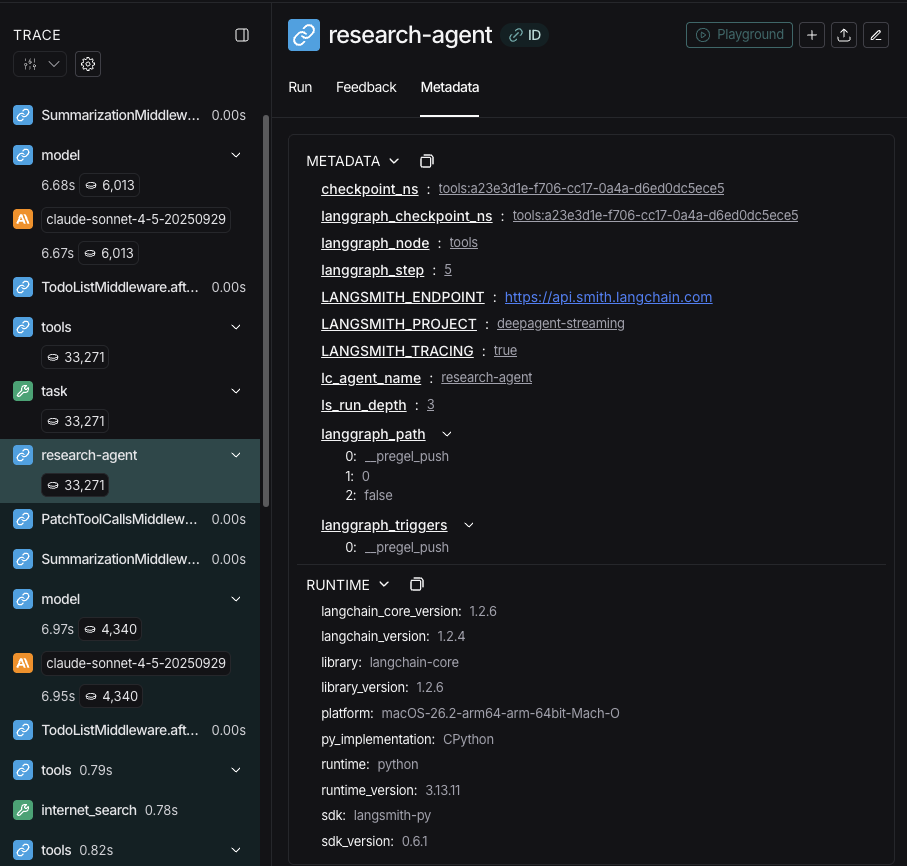
TIP
Open the run in LangSmith to compare the coordinator trace with each subagent run. Follow the observability quickstart to get set up. We recommend you also set up LangSmith Engine which monitors your traces, detects issues, and proposes fixes.
Filter by subagent in LangSmith
Because each subagent's name is written to the lc_agent_name metadata key on every run it produces, you can use LangSmith's metadata filtering to isolate all runs from a specific subagent — useful for debugging, monitoring, or comparing subagent behavior over time.
Filter in the LangSmith UI
- Open your tracing project in LangSmith.
- Switch the view to Runs on the Tracing project page to see individual spans.
- Click Add filter and select Metadata.
- Set the Key to
lc_agent_nameand the Value to the subagent name, for examplecoordinator.
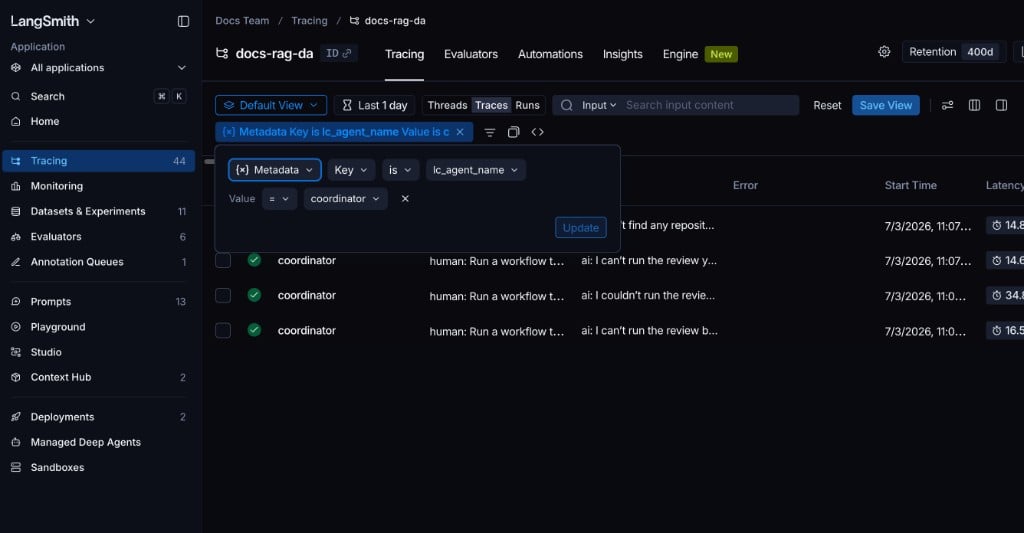
This shows only the runs produced by that subagent. You can save the filter as a named view for reuse. For a full reference on filtering options, see Filter traces.
Filter programmatically with the SDK
Use the has comparator in the LangSmith filter query language to match runs by metadata key-value pair:
from langsmith import Client

client = Client()

runs = client.list_runs(
    project_name="<your-project>",
    filter='has(metadata, \'{"lc_agent_name": "research-agent"}\')',
)

for run in runs:
    print(run.name, run.start_time, run.status)
To fetch runs from any named subagent (excluding the main agent), filter for runs that have the lc_agent_name key at all:
runs = client.list_runs(
    project_name="<your-project>",
    filter="has(metadata, 'lc_agent_name')",
)
For the full filter query language reference, see Trace query syntax.
Structured output
Subagents support structured output, so the parent agent receives predictable, parseable JSON instead of free-form text.
NOTE
Structured output for subagents requires deepagents>=1.8.4.
Pass responseFormat on the subagent config. When the subagent finishes, its structured response is JSON-serialized and returned as the ToolMessage content to the parent agent. The schema accepts anything supported by createAgent: Zod schemas, JSON schema objects, toolStrategy(...), or providerStrategy(...).
import { z } from "zod";
import { createDeepAgent } from "deepagents";
import { tool } from "langchain";

const webSearch = tool(
  async ({ query }: { query: string }) => `web results for ${query}`,
  {
    name: "web_search",
    description: "Search the web",
    schema: z.object({ query: z.string() }),
  },
);

const ResearchFindings = z.object({
  summary: z.string().describe("Summary of findings"),
  confidence: z.number().describe("Confidence score from 0 to 1"),
  sources: z.array(z.string()).describe("List of source URLs"),
});

const researchSubagent = {
  name: "researcher",
  description: "Researches topics and returns structured findings",
  systemPrompt: "Research the given topic thoroughly. Return your findings.",
  tools: [webSearch],
  responseFormat: ResearchFindings,
};

const agent = createDeepAgent({
  model: "google:gemini-3.6-flash",
  subagents: [researchSubagent],
});

const result = await agent.invoke({
  messages: [
    { role: "user", content: "Research recent advances in quantum computing" },
  ],
});

// The parent's ToolMessage contains JSON-serialized structured data:
// '{"summary": "...", "confidence": 0.87, "sources": ["https://..."]}'import { z } from "zod";
import { createDeepAgent } from "deepagents";
import { tool } from "langchain";
const webSearch = tool(
async ({ query }: { query: string }) => `web results for ${query}`,
{
name: "web_search",
description: "Search the web",
schema: z.object({ query: z.string() }),
},
);
const ResearchFindings = z.object({
summary: z.string().describe("Summary of findings"),
confidence: z.number().describe("Confidence score from 0 to 1"),
sources: z.array(z.string()).describe("List of source URLs"),
});
const researchSubagent = {
name: "researcher",
description: "Researches topics and returns structured findings",
systemPrompt: "Research the given topic thoroughly. Return your findings.",
tools: [webSearch],
responseFormat: ResearchFindings,
};
const agent = createDeepAgent({
model: "openai:gpt-5.5",
subagents: [researchSubagent],
});
const result = await agent.invoke({
messages: [
{ role: "user", content: "Research recent advances in quantum computing" },
],
});
// The parent's ToolMessage contains JSON-serialized structured data:
// '{"summary": "...", "confidence": 0.87, "sources": ["https://..."]}'import { z } from "zod";
import { createDeepAgent } from "deepagents";
import { tool } from "langchain";
const webSearch = tool(
async ({ query }: { query: string }) => `web results for ${query}`,
{
name: "web_search",
description: "Search the web",
schema: z.object({ query: z.string() }),
},
);
const ResearchFindings = z.object({
summary: z.string().describe("Summary of findings"),
confidence: z.number().describe("Confidence score from 0 to 1"),
sources: z.array(z.string()).describe("List of source URLs"),
});
const researchSubagent = {
name: "researcher",
description: "Researches topics and returns structured findings",
systemPrompt: "Research the given topic thoroughly. Return your findings.",
tools: [webSearch],
responseFormat: ResearchFindings,
};
const agent = createDeepAgent({
model: "anthropic:claude-sonnet-5",
subagents: [researchSubagent],
});
const result = await agent.invoke({
messages: [
{ role: "user", content: "Research recent advances in quantum computing" },
],
});
// The parent's ToolMessage contains JSON-serialized structured data:
// '{"summary": "...", "confidence": 0.87, "sources": ["https://..."]}'import { z } from "zod";
import { createDeepAgent } from "deepagents";
import { tool } from "langchain";
const webSearch = tool(
async ({ query }: { query: string }) => `web results for ${query}`,
{
name: "web_search",
description: "Search the web",
schema: z.object({ query: z.string() }),
},
);
const ResearchFindings = z.object({
summary: z.string().describe("Summary of findings"),
confidence: z.number().describe("Confidence score from 0 to 1"),
sources: z.array(z.string()).describe("List of source URLs"),
});
const researchSubagent = {
name: "researcher",
description: "Researches topics and returns structured findings",
systemPrompt: "Research the given topic thoroughly. Return your findings.",
tools: [webSearch],
responseFormat: ResearchFindings,
};
const agent = createDeepAgent({
model: "openrouter:z-ai/glm-5.2",
subagents: [researchSubagent],
});
const result = await agent.invoke({
messages: [
{ role: "user", content: "Research recent advances in quantum computing" },
],
});
// The parent's ToolMessage contains JSON-serialized structured data:
// '{"summary": "...", "confidence": 0.87, "sources": ["https://..."]}'import { z } from "zod";
import { createDeepAgent } from "deepagents";
import { tool } from "langchain";
const webSearch = tool(
async ({ query }: { query: string }) => `web results for ${query}`,
{
name: "web_search",
description: "Search the web",
schema: z.object({ query: z.string() }),
},
);
const ResearchFindings = z.object({
summary: z.string().describe("Summary of findings"),
confidence: z.number().describe("Confidence score from 0 to 1"),
sources: z.array(z.string()).describe("List of source URLs"),
});
const researchSubagent = {
name: "researcher",
description: "Researches topics and returns structured findings",
systemPrompt: "Research the given topic thoroughly. Return your findings.",
tools: [webSearch],
responseFormat: ResearchFindings,
};
const agent = createDeepAgent({
model: "fireworks:accounts/fireworks/models/glm-5p2",
subagents: [researchSubagent],
});
const result = await agent.invoke({
messages: [
{ role: "user", content: "Research recent advances in quantum computing" },
],
});
// The parent's ToolMessage contains JSON-serialized structured data:
// '{"summary": "...", "confidence": 0.87, "sources": ["https://..."]}'import { z } from "zod";
import { createDeepAgent } from "deepagents";
import { tool } from "langchain";
const webSearch = tool(
async ({ query }: { query: string }) => `web results for ${query}`,
{
name: "web_search",
description: "Search the web",
schema: z.object({ query: z.string() }),
},
);
const ResearchFindings = z.object({
summary: z.string().describe("Summary of findings"),
confidence: z.number().describe("Confidence score from 0 to 1"),
sources: z.array(z.string()).describe("List of source URLs"),
});
const researchSubagent = {
name: "researcher",
description: "Researches topics and returns structured findings",
systemPrompt: "Research the given topic thoroughly. Return your findings.",
tools: [webSearch],
responseFormat: ResearchFindings,
};
const agent = createDeepAgent({
model: "baseten:zai-org/GLM-5.2",
subagents: [researchSubagent],
});
const result = await agent.invoke({
messages: [
{ role: "user", content: "Research recent advances in quantum computing" },
],
});
// The parent's ToolMessage contains JSON-serialized structured data:
// '{"summary": "...", "confidence": 0.87, "sources": ["https://..."]}'import { z } from "zod";
import { createDeepAgent } from "deepagents";
import { tool } from "langchain";
const webSearch = tool(
async ({ query }: { query: string }) => `web results for ${query}`,
{
name: "web_search",
description: "Search the web",
schema: z.object({ query: z.string() }),
},
);
const ResearchFindings = z.object({
summary: z.string().describe("Summary of findings"),
confidence: z.number().describe("Confidence score from 0 to 1"),
sources: z.array(z.string()).describe("List of source URLs"),
});
const researchSubagent = {
name: "researcher",
description: "Researches topics and returns structured findings",
systemPrompt: "Research the given topic thoroughly. Return your findings.",
tools: [webSearch],
responseFormat: ResearchFindings,
};
const agent = createDeepAgent({
model: "ollama:north-mini-code-1.0",
subagents: [researchSubagent],
});
const result = await agent.invoke({
messages: [
{ role: "user", content: "Research recent advances in quantum computing" },
],
});
// The parent's ToolMessage contains JSON-serialized structured data:
// '{"summary": "...", "confidence": 0.87, "sources": ["https://..."]}'Open a public LangSmith run for this example.
Without response_format, the parent receives the subagent's last message text as-is. With it, the parent always gets valid JSON matching the schema, which is useful when the parent needs to process the result programmatically or pass it to downstream tools.
For full details on schema types and strategies (tool calling vs. provider-native), see Structured output.
The general-purpose subagent
In addition to any user-defined subagents, every deep agent has access to a general-purpose subagent at all times. This subagent:
- Uses its own default system prompt with profile overlays applied
- Has access to all the same tools
- Uses the same model (unless overridden)
- Inherits skills from the main agent (when skills are configured)
Override the general-purpose subagent
Include a subagent with name: "general-purpose" in your subagents list to replace the default. Use this to configure a different model, tools, or system prompt for the general-purpose subagent:
import { createDeepAgent } from "deepagents";
import { tool } from "langchain";
import { z } from "zod";

const internetSearch = tool(
  async ({ query }: { query: string }) => `search results for ${query}`,
  {
    name: "internet_search",
    description: "Run a web search",
    schema: z.object({ query: z.string() }),
  },
);

// Main agent uses Gemini; general-purpose subagent uses GPT
const agent = await createDeepAgent({
  model: "google:gemini-3.6-flash",
  tools: [internetSearch],
  subagents: [
    {
      name: "general-purpose",
      description: "General-purpose agent for research and multi-step tasks",
      systemPrompt: "You are a general-purpose assistant.",
      tools: [internetSearch],
      model: "openai:gpt-5.5", // Different model for delegated tasks
    },
  ],
});import { createDeepAgent } from "deepagents";
import { tool } from "langchain";
import { z } from "zod";
const internetSearch = tool(
async ({ query }: { query: string }) => `search results for ${query}`,
{
name: "internet_search",
description: "Run a web search",
schema: z.object({ query: z.string() }),
},
);
// Main agent uses Gemini; general-purpose subagent uses GPT
const agent = await createDeepAgent({
model: "openai:gpt-5.5",
tools: [internetSearch],
subagents: [
{
name: "general-purpose",
description: "General-purpose agent for research and multi-step tasks",
systemPrompt: "You are a general-purpose assistant.",
tools: [internetSearch],
model: "openai:gpt-5.5", // Different model for delegated tasks
},
],
});import { createDeepAgent } from "deepagents";
import { tool } from "langchain";
import { z } from "zod";
const internetSearch = tool(
async ({ query }: { query: string }) => `search results for ${query}`,
{
name: "internet_search",
description: "Run a web search",
schema: z.object({ query: z.string() }),
},
);
// Main agent uses Gemini; general-purpose subagent uses GPT
const agent = await createDeepAgent({
model: "anthropic:claude-sonnet-5",
tools: [internetSearch],
subagents: [
{
name: "general-purpose",
description: "General-purpose agent for research and multi-step tasks",
systemPrompt: "You are a general-purpose assistant.",
tools: [internetSearch],
model: "openai:gpt-5.5", // Different model for delegated tasks
},
],
});import { createDeepAgent } from "deepagents";
import { tool } from "langchain";
import { z } from "zod";
const internetSearch = tool(
async ({ query }: { query: string }) => `search results for ${query}`,
{
name: "internet_search",
description: "Run a web search",
schema: z.object({ query: z.string() }),
},
);
// Main agent uses Gemini; general-purpose subagent uses GPT
const agent = await createDeepAgent({
model: "openrouter:z-ai/glm-5.2",
tools: [internetSearch],
subagents: [
{
name: "general-purpose",
description: "General-purpose agent for research and multi-step tasks",
systemPrompt: "You are a general-purpose assistant.",
tools: [internetSearch],
model: "openai:gpt-5.5", // Different model for delegated tasks
},
],
});import { createDeepAgent } from "deepagents";
import { tool } from "langchain";
import { z } from "zod";
const internetSearch = tool(
async ({ query }: { query: string }) => `search results for ${query}`,
{
name: "internet_search",
description: "Run a web search",
schema: z.object({ query: z.string() }),
},
);
// Main agent uses Gemini; general-purpose subagent uses GPT
const agent = await createDeepAgent({
model: "fireworks:accounts/fireworks/models/glm-5p2",
tools: [internetSearch],
subagents: [
{
name: "general-purpose",
description: "General-purpose agent for research and multi-step tasks",
systemPrompt: "You are a general-purpose assistant.",
tools: [internetSearch],
model: "openai:gpt-5.5", // Different model for delegated tasks
},
],
});import { createDeepAgent } from "deepagents";
import { tool } from "langchain";
import { z } from "zod";
const internetSearch = tool(
async ({ query }: { query: string }) => `search results for ${query}`,
{
name: "internet_search",
description: "Run a web search",
schema: z.object({ query: z.string() }),
},
);
// Main agent uses Gemini; general-purpose subagent uses GPT
const agent = await createDeepAgent({
model: "baseten:zai-org/GLM-5.2",
tools: [internetSearch],
subagents: [
{
name: "general-purpose",
description: "General-purpose agent for research and multi-step tasks",
systemPrompt: "You are a general-purpose assistant.",
tools: [internetSearch],
model: "openai:gpt-5.5", // Different model for delegated tasks
},
],
});import { createDeepAgent } from "deepagents";
import { tool } from "langchain";
import { z } from "zod";
const internetSearch = tool(
async ({ query }: { query: string }) => `search results for ${query}`,
{
name: "internet_search",
description: "Run a web search",
schema: z.object({ query: z.string() }),
},
);
// Main agent uses Gemini; general-purpose subagent uses GPT
const agent = await createDeepAgent({
model: "ollama:north-mini-code-1.0",
tools: [internetSearch],
subagents: [
{
name: "general-purpose",
description: "General-purpose agent for research and multi-step tasks",
systemPrompt: "You are a general-purpose assistant.",
tools: [internetSearch],
model: "openai:gpt-5.5", // Different model for delegated tasks
},
],
});When you provide a subagent with the general-purpose name, the default general-purpose subagent is not added. Your spec fully replaces it.
To remove the built-in general-purpose subagent entirely instead of replacing it, set the active harness profile's general-purpose subagent enabled flag to False.
When to use it
The general-purpose subagent is ideal for context isolation without specialized behavior. The main agent can delegate a complex multi-step task to this subagent and get a concise result back without bloat from intermediate tool calls.
Example
Instead of the main agent making 10 web searches and filling its context with results, it delegates to the general-purpose subagent:
task(name="general-purpose", task="Research quantum computing trends"). The subagent performs all the searches internally and returns only a summary.
Skills inheritance
When configuring skills with create_deep_agent:
- General-purpose subagent: Automatically inherits skills from the main agent
- Custom subagents: Do NOT inherit skills by default—use the
skillsparameter to give them their own skills
NOTE
Only subagents configured with skills get a SkillsMiddleware instance—custom subagents without a skills parameter do not. When present, skill state is fully isolated in both directions: the parent's skills are not visible to the child, and the child's skills are not propagated back to the parent.
import { createDeepAgent } from "deepagents";

const researchSubagent = {
  name: "researcher",
  description: "Research assistant with specialized skills",
  systemPrompt: "You are a researcher.",
  tools: [webSearch],
  skills: ["/skills/research/", "/skills/web-search/"], // Subagent-specific skills
};

const agent = await createDeepAgent({
  model: "google:gemini-3.6-flash",
  skills: ["/skills/main/"], // Main agent and GP subagent get these
  subagents: [researchSubagent], // Researcher gets only its own skills
});
Best practices
Write clear descriptions
The main agent uses descriptions to decide which subagent to call. Be specific:
✅ Good: "Analyzes financial data and generates investment insights with confidence scores"
❌ Bad: "Does finance stuff"
Keep system prompts detailed
Include specific guidance on how to use tools and format outputs:
const researchSubagent = {
  name: "research-agent",
  description:
    "Conducts in-depth research using web search and synthesizes findings",
  systemPrompt: `You are a thorough researcher. Your job is to:

  1. Break down the research question into searchable queries
  2. Use internet_search to find relevant information
  3. Synthesize findings into a comprehensive but concise summary
  4. Cite sources when making claims

  Output format:
  - Summary (2-3 paragraphs)
  - Key findings (bullet points)
  - Sources (with URLs)

  Keep your response under 500 words to maintain clean context.`,
  tools: [internetSearch],
};
Minimize tool sets
Only give subagents the tools they need. This improves focus and security:
// ✅ Good: Focused tool set
const emailAgent = {
  name: "email-sender",
  tools: [sendEmail, validateEmail], // Only email-related
};// ❌ Bad: Too many tools
const emailAgentBad = {
name: "email-sender",
tools: [sendEmail, webSearch, databaseQuery, fileUpload], // Unfocused
};Choose models by task
Different models excel at different tasks:
const subagents = [
  {
    name: "contract-reviewer",
    description: "Reviews legal documents and contracts",
    systemPrompt: "You are an expert legal reviewer...",
    tools: [readDocument, analyzeContract],
    model: "google:gemini-3.6-flash", // Large context for long documents
  },
  {
    name: "financial-analyst",
    description: "Analyzes financial data and market trends",
    systemPrompt: "You are an expert financial analyst...",
    tools: [getStockPrice, analyzeFundamentals],
    model: "openai:gpt-5.5", // Better for numerical analysis
  },
];const subagents = [
{
name: "contract-reviewer",
description: "Reviews legal documents and contracts",
systemPrompt: "You are an expert legal reviewer...",
tools: [readDocument, analyzeContract],
model: "openai:gpt-5.5", // Large context for long documents
},
{
name: "financial-analyst",
description: "Analyzes financial data and market trends",
systemPrompt: "You are an expert financial analyst...",
tools: [getStockPrice, analyzeFundamentals],
model: "openai:gpt-5.5", // Better for numerical analysis
},
];const subagents = [
{
name: "contract-reviewer",
description: "Reviews legal documents and contracts",
systemPrompt: "You are an expert legal reviewer...",
tools: [readDocument, analyzeContract],
model: "anthropic:claude-sonnet-5", // Large context for long documents
},
{
name: "financial-analyst",
description: "Analyzes financial data and market trends",
systemPrompt: "You are an expert financial analyst...",
tools: [getStockPrice, analyzeFundamentals],
model: "openai:gpt-5.5", // Better for numerical analysis
},
];const subagents = [
{
name: "contract-reviewer",
description: "Reviews legal documents and contracts",
systemPrompt: "You are an expert legal reviewer...",
tools: [readDocument, analyzeContract],
model: "openrouter:z-ai/glm-5.2", // Large context for long documents
},
{
name: "financial-analyst",
description: "Analyzes financial data and market trends",
systemPrompt: "You are an expert financial analyst...",
tools: [getStockPrice, analyzeFundamentals],
model: "openai:gpt-5.5", // Better for numerical analysis
},
];const subagents = [
{
name: "contract-reviewer",
description: "Reviews legal documents and contracts",
systemPrompt: "You are an expert legal reviewer...",
tools: [readDocument, analyzeContract],
model: "fireworks:accounts/fireworks/models/glm-5p2", // Large context for long documents
},
{
name: "financial-analyst",
description: "Analyzes financial data and market trends",
systemPrompt: "You are an expert financial analyst...",
tools: [getStockPrice, analyzeFundamentals],
model: "openai:gpt-5.5", // Better for numerical analysis
},
];const subagents = [
{
name: "contract-reviewer",
description: "Reviews legal documents and contracts",
systemPrompt: "You are an expert legal reviewer...",
tools: [readDocument, analyzeContract],
model: "baseten:zai-org/GLM-5.2", // Large context for long documents
},
{
name: "financial-analyst",
description: "Analyzes financial data and market trends",
systemPrompt: "You are an expert financial analyst...",
tools: [getStockPrice, analyzeFundamentals],
model: "openai:gpt-5.5", // Better for numerical analysis
},
];const subagents = [
{
name: "contract-reviewer",
description: "Reviews legal documents and contracts",
systemPrompt: "You are an expert legal reviewer...",
tools: [readDocument, analyzeContract],
model: "ollama:north-mini-code-1.0", // Large context for long documents
},
{
name: "financial-analyst",
description: "Analyzes financial data and market trends",
systemPrompt: "You are an expert financial analyst...",
tools: [getStockPrice, analyzeFundamentals],
model: "openai:gpt-5.5", // Better for numerical analysis
},
];Return concise results
Instruct subagents to return summaries, not raw data:
const dataAnalyst = {
  systemPrompt: `Analyze the data and return:
  1. Key insights (3-5 bullet points)
  2. Overall confidence score
  3. Recommended next actions

  Do NOT include:
  - Raw data
  - Intermediate calculations
  - Detailed tool outputs

  Keep response under 300 words.`,
};
Common patterns
Multiple specialized subagents
Create specialized subagents for different domains:
import { createDeepAgent } from "deepagents";

const subagents = [
  {
    name: "data-collector",
    description: "Gathers raw data from various sources",
    systemPrompt: "Collect comprehensive data on the topic",
    tools: [webSearch, apiCall, databaseQuery],
  },
  {
    name: "data-analyzer",
    description: "Analyzes collected data for insights",
    systemPrompt: "Analyze data and extract key insights",
    tools: [statisticalAnalysis],
  },
  {
    name: "report-writer",
    description: "Writes polished reports from analysis",
    systemPrompt: "Create professional reports from insights",
    tools: [formatDocument],
  },
];

const agent = createDeepAgent({
  model: "google:gemini-3.6-flash",
  systemPrompt:
    "You coordinate data analysis and reporting. Use subagents for specialized tasks.",
  subagents: subagents,
});import { createDeepAgent } from "deepagents";
const subagents = [
{
name: "data-collector",
description: "Gathers raw data from various sources",
systemPrompt: "Collect comprehensive data on the topic",
tools: [webSearch, apiCall, databaseQuery],
},
{
name: "data-analyzer",
description: "Analyzes collected data for insights",
systemPrompt: "Analyze data and extract key insights",
tools: [statisticalAnalysis],
},
{
name: "report-writer",
description: "Writes polished reports from analysis",
systemPrompt: "Create professional reports from insights",
tools: [formatDocument],
},
];
const agent = createDeepAgent({
model: "openai:gpt-5.5",
systemPrompt:
"You coordinate data analysis and reporting. Use subagents for specialized tasks.",
subagents: subagents,
});import { createDeepAgent } from "deepagents";
const subagents = [
{
name: "data-collector",
description: "Gathers raw data from various sources",
systemPrompt: "Collect comprehensive data on the topic",
tools: [webSearch, apiCall, databaseQuery],
},
{
name: "data-analyzer",
description: "Analyzes collected data for insights",
systemPrompt: "Analyze data and extract key insights",
tools: [statisticalAnalysis],
},
{
name: "report-writer",
description: "Writes polished reports from analysis",
systemPrompt: "Create professional reports from insights",
tools: [formatDocument],
},
];
const agent = createDeepAgent({
model: "anthropic:claude-sonnet-5",
systemPrompt:
"You coordinate data analysis and reporting. Use subagents for specialized tasks.",
subagents: subagents,
});import { createDeepAgent } from "deepagents";
const subagents = [
{
name: "data-collector",
description: "Gathers raw data from various sources",
systemPrompt: "Collect comprehensive data on the topic",
tools: [webSearch, apiCall, databaseQuery],
},
{
name: "data-analyzer",
description: "Analyzes collected data for insights",
systemPrompt: "Analyze data and extract key insights",
tools: [statisticalAnalysis],
},
{
name: "report-writer",
description: "Writes polished reports from analysis",
systemPrompt: "Create professional reports from insights",
tools: [formatDocument],
},
];
const agent = createDeepAgent({
model: "openrouter:z-ai/glm-5.2",
systemPrompt:
"You coordinate data analysis and reporting. Use subagents for specialized tasks.",
subagents: subagents,
});import { createDeepAgent } from "deepagents";
const subagents = [
{
name: "data-collector",
description: "Gathers raw data from various sources",
systemPrompt: "Collect comprehensive data on the topic",
tools: [webSearch, apiCall, databaseQuery],
},
{
name: "data-analyzer",
description: "Analyzes collected data for insights",
systemPrompt: "Analyze data and extract key insights",
tools: [statisticalAnalysis],
},
{
name: "report-writer",
description: "Writes polished reports from analysis",
systemPrompt: "Create professional reports from insights",
tools: [formatDocument],
},
];
const agent = createDeepAgent({
model: "fireworks:accounts/fireworks/models/glm-5p2",
systemPrompt:
"You coordinate data analysis and reporting. Use subagents for specialized tasks.",
subagents: subagents,
});import { createDeepAgent } from "deepagents";
const subagents = [
{
name: "data-collector",
description: "Gathers raw data from various sources",
systemPrompt: "Collect comprehensive data on the topic",
tools: [webSearch, apiCall, databaseQuery],
},
{
name: "data-analyzer",
description: "Analyzes collected data for insights",
systemPrompt: "Analyze data and extract key insights",
tools: [statisticalAnalysis],
},
{
name: "report-writer",
description: "Writes polished reports from analysis",
systemPrompt: "Create professional reports from insights",
tools: [formatDocument],
},
];
const agent = createDeepAgent({
model: "baseten:zai-org/GLM-5.2",
systemPrompt:
"You coordinate data analysis and reporting. Use subagents for specialized tasks.",
subagents: subagents,
});import { createDeepAgent } from "deepagents";
const subagents = [
{
name: "data-collector",
description: "Gathers raw data from various sources",
systemPrompt: "Collect comprehensive data on the topic",
tools: [webSearch, apiCall, databaseQuery],
},
{
name: "data-analyzer",
description: "Analyzes collected data for insights",
systemPrompt: "Analyze data and extract key insights",
tools: [statisticalAnalysis],
},
{
name: "report-writer",
description: "Writes polished reports from analysis",
systemPrompt: "Create professional reports from insights",
tools: [formatDocument],
},
];
const agent = createDeepAgent({
model: "ollama:north-mini-code-1.0",
systemPrompt:
"You coordinate data analysis and reporting. Use subagents for specialized tasks.",
subagents: subagents,
});Workflow:
- Main agent creates high-level plan
- Delegates data collection to data-collector
- Passes results to data-analyzer
- Sends insights to report-writer
- Compiles final output
Each subagent works with clean context focused only on its task.
Context management
When you invoke a parent agent with runtime context, that context automatically propagates to all subagents. Each subagent run receives the same runtime context you passed on the parent invoke / ainvoke call.
This means tools running inside any subagent can access the same context values you provided to the parent:
import { createDeepAgent } from "deepagents";
import { tool } from "langchain";
import type { ToolRuntime } from "@langchain/core/tools";
import { z } from "zod";

const contextSchema = z.object({
  userId: z.string(),
  sessionId: z.string(),
});

const getUserData = tool(
  async (input, runtime: ToolRuntime<unknown, typeof contextSchema>) => {
    const userId = runtime.context?.userId;
    return `Data for user ${userId}: ${input.query}`;
  },
  {
    name: "get_user_data",
    description: "Fetch data for the current user",
    schema: z.object({ query: z.string() }),
  },
);

const researchSubagent = {
  name: "researcher",
  description: "Conducts research for the current user",
  systemPrompt: "You are a research assistant.",
  tools: [getUserData],
};

const agent = createDeepAgent({
  model: "google:gemini-3.6-flash",
  subagents: [researchSubagent],
  contextSchema,
});

// Context flows to the researcher subagent and its tools automatically
const result = await agent.invoke(
  { messages: [new HumanMessage("Look up my recent activity")] },
  { context: { userId: "user-123", sessionId: "abc" } },
);import { createDeepAgent } from "deepagents";
import { tool } from "langchain";
import type { ToolRuntime } from "@langchain/core/tools";
import { z } from "zod";
const contextSchema = z.object({
userId: z.string(),
sessionId: z.string(),
});
const getUserData = tool(
async (input, runtime: ToolRuntime<unknown, typeof contextSchema>) => {
const userId = runtime.context?.userId;
return `Data for user ${userId}: ${input.query}`;
},
{
name: "get_user_data",
description: "Fetch data for the current user",
schema: z.object({ query: z.string() }),
},
);
const researchSubagent = {
name: "researcher",
description: "Conducts research for the current user",
systemPrompt: "You are a research assistant.",
tools: [getUserData],
};
const agent = createDeepAgent({
model: "openai:gpt-5.5",
subagents: [researchSubagent],
contextSchema,
});
// Context flows to the researcher subagent and its tools automatically
const result = await agent.invoke(
{ messages: [new HumanMessage("Look up my recent activity")] },
{ context: { userId: "user-123", sessionId: "abc" } },
);import { createDeepAgent } from "deepagents";
import { tool } from "langchain";
import type { ToolRuntime } from "@langchain/core/tools";
import { z } from "zod";
const contextSchema = z.object({
userId: z.string(),
sessionId: z.string(),
});
const getUserData = tool(
async (input, runtime: ToolRuntime<unknown, typeof contextSchema>) => {
const userId = runtime.context?.userId;
return `Data for user ${userId}: ${input.query}`;
},
{
name: "get_user_data",
description: "Fetch data for the current user",
schema: z.object({ query: z.string() }),
},
);
const researchSubagent = {
name: "researcher",
description: "Conducts research for the current user",
systemPrompt: "You are a research assistant.",
tools: [getUserData],
};
const agent = createDeepAgent({
model: "anthropic:claude-sonnet-5",
subagents: [researchSubagent],
contextSchema,
});
// Context flows to the researcher subagent and its tools automatically
const result = await agent.invoke(
{ messages: [new HumanMessage("Look up my recent activity")] },
{ context: { userId: "user-123", sessionId: "abc" } },
);import { createDeepAgent } from "deepagents";
import { tool } from "langchain";
import type { ToolRuntime } from "@langchain/core/tools";
import { z } from "zod";
const contextSchema = z.object({
userId: z.string(),
sessionId: z.string(),
});
const getUserData = tool(
async (input, runtime: ToolRuntime<unknown, typeof contextSchema>) => {
const userId = runtime.context?.userId;
return `Data for user ${userId}: ${input.query}`;
},
{
name: "get_user_data",
description: "Fetch data for the current user",
schema: z.object({ query: z.string() }),
},
);
const researchSubagent = {
name: "researcher",
description: "Conducts research for the current user",
systemPrompt: "You are a research assistant.",
tools: [getUserData],
};
const agent = createDeepAgent({
model: "openrouter:z-ai/glm-5.2",
subagents: [researchSubagent],
contextSchema,
});
// Context flows to the researcher subagent and its tools automatically
const result = await agent.invoke(
{ messages: [new HumanMessage("Look up my recent activity")] },
{ context: { userId: "user-123", sessionId: "abc" } },
);import { createDeepAgent } from "deepagents";
import { tool } from "langchain";
import type { ToolRuntime } from "@langchain/core/tools";
import { z } from "zod";
const contextSchema = z.object({
userId: z.string(),
sessionId: z.string(),
});
const getUserData = tool(
async (input, runtime: ToolRuntime<unknown, typeof contextSchema>) => {
const userId = runtime.context?.userId;
return `Data for user ${userId}: ${input.query}`;
},
{
name: "get_user_data",
description: "Fetch data for the current user",
schema: z.object({ query: z.string() }),
},
);
const researchSubagent = {
name: "researcher",
description: "Conducts research for the current user",
systemPrompt: "You are a research assistant.",
tools: [getUserData],
};
const agent = createDeepAgent({
model: "fireworks:accounts/fireworks/models/glm-5p2",
subagents: [researchSubagent],
contextSchema,
});
// Context flows to the researcher subagent and its tools automatically
const result = await agent.invoke(
{ messages: [new HumanMessage("Look up my recent activity")] },
{ context: { userId: "user-123", sessionId: "abc" } },
);import { createDeepAgent } from "deepagents";
import { tool } from "langchain";
import type { ToolRuntime } from "@langchain/core/tools";
import { z } from "zod";
const contextSchema = z.object({
userId: z.string(),
sessionId: z.string(),
});
const getUserData = tool(
async (input, runtime: ToolRuntime<unknown, typeof contextSchema>) => {
const userId = runtime.context?.userId;
return `Data for user ${userId}: ${input.query}`;
},
{
name: "get_user_data",
description: "Fetch data for the current user",
schema: z.object({ query: z.string() }),
},
);
const researchSubagent = {
name: "researcher",
description: "Conducts research for the current user",
systemPrompt: "You are a research assistant.",
tools: [getUserData],
};
const agent = createDeepAgent({
model: "baseten:zai-org/GLM-5.2",
subagents: [researchSubagent],
contextSchema,
});
// Context flows to the researcher subagent and its tools automatically
const result = await agent.invoke(
{ messages: [new HumanMessage("Look up my recent activity")] },
{ context: { userId: "user-123", sessionId: "abc" } },
);import { createDeepAgent } from "deepagents";
import { tool } from "langchain";
import type { ToolRuntime } from "@langchain/core/tools";
import { z } from "zod";
const contextSchema = z.object({
userId: z.string(),
sessionId: z.string(),
});
const getUserData = tool(
async (input, runtime: ToolRuntime<unknown, typeof contextSchema>) => {
const userId = runtime.context?.userId;
return `Data for user ${userId}: ${input.query}`;
},
{
name: "get_user_data",
description: "Fetch data for the current user",
schema: z.object({ query: z.string() }),
},
);
const researchSubagent = {
name: "researcher",
description: "Conducts research for the current user",
systemPrompt: "You are a research assistant.",
tools: [getUserData],
};
const agent = createDeepAgent({
model: "ollama:north-mini-code-1.0",
subagents: [researchSubagent],
contextSchema,
});
// Context flows to the researcher subagent and its tools automatically
const result = await agent.invoke(
{ messages: [new HumanMessage("Look up my recent activity")] },
{ context: { userId: "user-123", sessionId: "abc" } },
);Per-subagent context
All subagents receive the same parent context. To pass configuration that is specific to a particular subagent, use namespaced keys (prefix keys with the subagent name, for example researcher:max_depth) in a flat context mapping, or model those settings as separate fields on your context type:
import { tool } from "langchain";
import type { ToolRuntime } from "@langchain/core/tools";
import { z } from "zod";

const contextSchema = z.object({
  userId: z.string(),
  researcherMaxDepth: z.number().optional(),
  factCheckerStrictMode: z.boolean().optional(),
});

const verifyClaim = tool(
  async (input, runtime: ToolRuntime<unknown, typeof contextSchema>) => {
    const strictMode = runtime.context?.factCheckerStrictMode ?? false;
    if (strictMode) {
      return strictVerification(input.claim);
    }
    return basicVerification(input.claim);
  },
  {
    name: "verify_claim",
    description: "Verify a factual claim",
    schema: z.object({ claim: z.string() }),
  },
);Open a public LangSmith run for this example.
Identifying which subagent called a tool
When the same tool is shared between the parent and multiple subagents, you can use the lc_agent_name metadata (the same value used in streaming) to determine which agent initiated the call:
import { tool } from "langchain";
import type { ToolRuntime } from "@langchain/core/tools";
import { z } from "zod";

const sharedLookup = tool(
  async (input, runtime: ToolRuntime) => {
    const agentName = runtime.config?.metadata?.lc_agent_name;
    if (agentName === "fact-checker") {
      return strictLookup(input.query);
    }
    return generalLookup(input.query);
  },
  {
    name: "shared_lookup",
    description: "Look up information from various sources",
    schema: z.object({ query: z.string() }),
  },
);Open a public LangSmith run for this example.
You can combine both patterns—read agent-specific settings from runtime.context and read lc_agent_name from runtime.config metadata when branching tool behavior.
import { tool } from "langchain";
import type { ToolRuntime } from "@langchain/core/tools";
import { z } from "zod";

const contextSchema = z.object({
  userId: z.string(),
  researcherMaxDepth: z.number().optional(),
  factCheckerStrictMode: z.boolean().optional(),
});

const flexibleSearch = tool(
  async (input, runtime: ToolRuntime<unknown, typeof contextSchema>) => {
    const agentName = runtime.config?.metadata?.lc_agent_name ?? "unknown";
    const ctx = runtime.context;
    const maxResults =
      agentName === "researcher" ? (ctx?.researcherMaxDepth ?? 5) : 5;
    const includeRaw = false;

    return performSearch(input.query, { maxResults, includeRaw });
  },
  {
    name: "flexible_search",
    description: "Search with agent-specific settings",
    schema: z.object({ query: z.string() }),
  },
);Open a public LangSmith run for this example.
Troubleshooting
Subagent not being called
Problem: Main agent tries to do work itself instead of delegating.
Solutions:
- Make descriptions more specific:
   // ✅ Good
   const goodDescription = {
     name: "research-specialist",
     description:
       "Conducts in-depth research on specific topics using web search. Use when you need detailed information that requires multiple searches.",
}; // ❌ Bad
const badDescription = {
name: "helper",
description: "helps with stuff",
};- Instruct main agent to delegate:
   import { createDeepAgent } from "deepagents";

   const agent = createDeepAgent({
     systemPrompt: `...your instructions...

     IMPORTANT: For complex tasks, delegate to your subagents using the task() tool.
     This keeps your context clean and improves results.`,
     subagents: [
       {
         name: "research-agent",
         description: "Conducts research",
         systemPrompt: "You are a researcher.",
       },
     ],
   });
Context still getting bloated
Problem: Context fills up despite using subagents.
Solutions:
- Instruct subagent to return concise results:
   const systemPrompt = `...

   IMPORTANT: Return only the essential summary.
   Do NOT include raw data, intermediate search results, or detailed tool outputs.
Your response should be under 500 words.`;- Use filesystem for large data:
   const filesystemPrompt = `When you gather large amounts of data:
   1. Save raw data to /data/raw_results.txt
   2. Process and analyze the data
   3. Return only the analysis summary

   This keeps context clean.`;
Wrong subagent being selected
Problem: Main agent calls inappropriate subagent for the task.
Solution: Differentiate subagents clearly in descriptions:
const subagents = [
  {
    name: "quick-researcher",
    description:
      "For simple, quick research questions that need 1-2 searches. Use when you need basic facts or definitions.",
    systemPrompt: "You are the quick-researcher subagent.",
  },
  {
    name: "deep-researcher",
    description:
      "For complex, in-depth research requiring multiple searches, synthesis, and analysis. Use for comprehensive reports.",
    systemPrompt: "You are the deep-researcher subagent.",
  },
];
Connect these docs to your agent of choice via MCP for real-time answers.