
上下文工程 (Context engineering)
管理并优化 deep agent 的上下文流动、Token 预算与长期状态
在复杂的长周期智能体任务中,上下文工程决定了智能体能否在有限的模型窗口与 Token 预算内稳定、高质量地完成任务。 Deep Agents 运行框架通过系统性的分层治理,使智能体能够兼顾即时推理精度与跨轮次记忆深度。
上下文的分类体系
智能体上下文由四个不同生命周期的层次组成:
- 输入上下文 (Input context):智能体启动时初始化的基础静态配置。
- 运行时上下文 (Runtime context):每次调用时动态传入的外部请求环境(如当前用户、鉴权令牌、功能开关)。
- 压缩上下文 (Compressed context):在执行过程中自动修剪、摘要和卸载的历史轮次与大型中间产物。
- 长期存储上下文 (Long-term memory):跨会话持久沉淀在文件系统后端中的结构化记忆与数据。
输入上下文装配 (Input context)
输入上下文决定了模型在第一轮对话开始时所拥有的全部认知基准:
1. 系统提示词 (System prompt)
基础的人设定义与顶级行为指导。
2. 长期记忆 (Memory)
从 AGENTS.md 中加载的持久规则,自动拼装在系统提示词之后。
3. 技能列表 (Skills)
以紧凑的 Frontmatter 元数据展示所有可用技能的名称与触发条件。
4. 工具描述 (Tool prompts)
所有内置与自定义工具的 JSON Schema 定义。
import { createDeepAgent } from "deepagents";

const agent = await createDeepAgent({
  model: "google:gemini-3.6-flash",
  systemPrompt: `You are a research assistant specializing in scientific literature.
  Always cite sources. Use subagents for parallel research on different topics.`,
});
运行时动态上下文 (Runtime context)
除了固定在代码里的配置外,每次请求往往伴随着特定的动态环境(当前租户 ID、用户的个性化设置、第三方 OAuth 访问令牌)。 通过 contextSchema 定义类型安全的运行时上下文模式,并在调用 invoke 时动态传入:
import { createDeepAgent } from "deepagents";

const agent = await createDeepAgent({
  model: "openai:gpt-5.5",
  systemPrompt: `You are a research assistant specializing in scientific literature.
  Always cite sources. Use subagents for parallel research on different topics.`,
});
上下文自动压缩治理 (Context compression)
长周期任务中,随着工具调用和多轮问答推进,上下文窗口会迅速膨胀,最终触发模型的最大 Token 限制或导致推理质量劣化(Lost in the Middle 现象)。 Deep Agents 内置了双重自动化压缩防线:
1. 大型中间结果卸载 (Offloading)
当某个工具返回海量数据(例如爬取整个网页的 HTML、读取包含数千行代码的大文件)时,框架会自动拦截并把完整内容存入虚拟文件系统,仅向模型上下文返回带有文件引用的轻量占位符。智能体在需要时可以使用切片读取工具按需读取。
2. 自动化对话历史摘要 (Summarization)
当对话历史消息累计的 Token 超过设定的阈值时,内置的摘要中间件会在后台对过早的历史轮次进行压缩,提炼出精炼的事实摘要,替换掉原本冗长的大段交互记录,同时完整保留最近若干轮关键对话。
基于子智能体的上下文隔离 (Context isolation)
治理上下文最强有力的工程手段是任务委派与上下文物理隔离。 与其让主智能体背负所有琐碎的技术细节,不如衍生一个临时的子智能体去独立执行繁重的子任务。
- 子智能体在一个完全独立纯净的上下文窗口中启动。
- 它可以执行上百次密集的工具调用。
- 执行完毕后,子智能体仅向主智能体返回一份数行的总结报告。
- 所有的中间步骤垃圾 Token 完全随子智能体的销毁而被释放,主智能体上下文保持极致轻盈。
长期记忆系统 (Long-term memory)
跨对话长期保存的偏好与事实,请配合 StoreBackend 存储在 AGENTS.md 中。
上下文工程最佳实践
- 始终使用渐进式披露:不要把所有领域的全部知识一股脑塞进初始提示词,优先使用技能按需拉取。
- 大产物必须卸载:对大文本和大文件执行文件系统转储,只留摘要与路径。
- 繁重工作委派给子智能体:保持主智能体作为战略调度中枢,脏活累活下放给子智能体。
- 合理调优摘要阈值:根据所选模型的上下文窗口容量,保留恰当的最近消息轮次。
import { createDeepAgent } from "deepagents";

const agent = await createDeepAgent({
  model: "anthropic:claude-sonnet-5",
  systemPrompt: `You are a research assistant specializing in scientific literature.
  Always cite sources. Use subagents for parallel research on different topics.`,
});import { createDeepAgent } from "deepagents";
const agent = await createDeepAgent({
model: "openrouter:z-ai/glm-5.2",
systemPrompt: `You are a research assistant specializing in scientific literature.
Always cite sources. Use subagents for parallel research on different topics.`,
});import { createDeepAgent } from "deepagents";
const agent = await createDeepAgent({
model: "fireworks:accounts/fireworks/models/glm-5p2",
systemPrompt: `You are a research assistant specializing in scientific literature.
Always cite sources. Use subagents for parallel research on different topics.`,
});import { createDeepAgent } from "deepagents";
const agent = await createDeepAgent({
model: "baseten:zai-org/GLM-5.2",
systemPrompt: `You are a research assistant specializing in scientific literature.
Always cite sources. Use subagents for parallel research on different topics.`,
});import { createDeepAgent } from "deepagents";
const agent = await createDeepAgent({
model: "ollama:north-mini-code-1.0",
systemPrompt: `You are a research assistant specializing in scientific literature.
Always cite sources. Use subagents for parallel research on different topics.`,
});The systemPrompt parameter is static which means it does not change per invocation. For some use cases you may want a dynamic prompt: for example, to tell the model "You have admin access" vs "You have read-only access," or to inject user preferences like "User prefers concise responses" from long-term memory. If your prompt depends on context or runtime.store, use dynamicSystemPromptMiddleware to build context-aware instructions. Your middleware can read request.runtime.context and request.runtime.store. See Customization for the Deep Agents stack and for adding custom middleware. See the LangChain context engineering guide for examples.
You do not need middleware when tools alone use context or runtime.store; tools receive the runtime object (including runtime.context and runtime.store) directly. Add middleware only when the system prompt itself must vary per request.
TIP
To adjust the assembled system prompt for a specific provider or model, use a harness profile: base_system_prompt replaces the base prompt outright, and system_prompt_suffix appends to it.
Memory
Memory files (AGENTS.md) provide persistent context that is always loaded into the system prompt. Use memory for project conventions, user preferences, and critical guidelines that should apply to every conversation:
import { createDeepAgent } from "deepagents";

const agent = await createDeepAgent({
  model: "google:gemini-3.6-flash",
  memory: ["/project/AGENTS.md", "~/.deepagents/preferences.md"],
});import { createDeepAgent } from "deepagents";
const agent = await createDeepAgent({
model: "openai:gpt-5.5",
memory: ["/project/AGENTS.md", "~/.deepagents/preferences.md"],
});import { createDeepAgent } from "deepagents";
const agent = await createDeepAgent({
model: "anthropic:claude-sonnet-5",
memory: ["/project/AGENTS.md", "~/.deepagents/preferences.md"],
});import { createDeepAgent } from "deepagents";
const agent = await createDeepAgent({
model: "openrouter:z-ai/glm-5.2",
memory: ["/project/AGENTS.md", "~/.deepagents/preferences.md"],
});import { createDeepAgent } from "deepagents";
const agent = await createDeepAgent({
model: "fireworks:accounts/fireworks/models/glm-5p2",
memory: ["/project/AGENTS.md", "~/.deepagents/preferences.md"],
});import { createDeepAgent } from "deepagents";
const agent = await createDeepAgent({
model: "baseten:zai-org/GLM-5.2",
memory: ["/project/AGENTS.md", "~/.deepagents/preferences.md"],
});import { createDeepAgent } from "deepagents";
const agent = await createDeepAgent({
model: "ollama:north-mini-code-1.0",
memory: ["/project/AGENTS.md", "~/.deepagents/preferences.md"],
});Unlike skills, memory is always injected—there is no progressive disclosure. Keep memory minimal to avoid context overload; use skills for detailed workflows and domain-specific content. See Memory for configuration details.
To generate a repository wiki that coding agents discover through AGENTS.md, see OpenWiki.
Skills
Skills provide on-demand capabilities. The agent reads frontmatter from each SKILL.md at startup, then loads full skill content only when it determines the skill is relevant. This reduces token usage while still providing specialized workflows:
import { createDeepAgent } from "deepagents";

const agent = await createDeepAgent({
  model: "google:gemini-3.6-flash",
  skills: ["/skills/research/", "/skills/web-search/"],
});import { createDeepAgent } from "deepagents";
const agent = await createDeepAgent({
model: "openai:gpt-5.5",
skills: ["/skills/research/", "/skills/web-search/"],
});import { createDeepAgent } from "deepagents";
const agent = await createDeepAgent({
model: "anthropic:claude-sonnet-5",
skills: ["/skills/research/", "/skills/web-search/"],
});import { createDeepAgent } from "deepagents";
const agent = await createDeepAgent({
model: "openrouter:z-ai/glm-5.2",
skills: ["/skills/research/", "/skills/web-search/"],
});import { createDeepAgent } from "deepagents";
const agent = await createDeepAgent({
model: "fireworks:accounts/fireworks/models/glm-5p2",
skills: ["/skills/research/", "/skills/web-search/"],
});import { createDeepAgent } from "deepagents";
const agent = await createDeepAgent({
model: "baseten:zai-org/GLM-5.2",
skills: ["/skills/research/", "/skills/web-search/"],
});import { createDeepAgent } from "deepagents";
const agent = await createDeepAgent({
model: "ollama:north-mini-code-1.0",
skills: ["/skills/research/", "/skills/web-search/"],
});Keep each skill focused on a single workflow or domain; broad or overlapping skills dilute relevance and bloat context when loaded. Within a skill, keep the main content concise and move detailed reference material to separate files that are referenced in the skill file. Put always-relevant conventions in memory. See Skills for authoring and configuration.
Tool prompts
Tool prompts are instructions that shape how the model uses tools. All tools expose metadata the model sees in its prompt—typically a schema and a description. Tools you pass via the tools parameter surface that tool metadata (schema and descriptions) to the model. A deep agent's built-in tools are packaged in the Deep Agents stack and typically also update the system prompt with more guidance for those tools.
Built-in tools: Middleware that adds harness capabilities (filesystem, subagents, and optional planning) automatically appends tool-specific instructions to the system prompt, creating tool prompts that explain how to use those tools effectively. See Customization for the full list:
Filesystem prompt: Documentation for
ls,read_file,write_file,edit_file,glob,grep(andexecutewhen using a sandbox backend)Subagent prompt: Guidance for delegating work with the
tasktoolHuman-in-the-loop prompt: Usage for pausing at specified tool calls (when
interrupt_onis set)Local context prompt: Current directory and project info (Deep Agents Code only)
Tools you provide: Tools passed via the tools parameter get their descriptions (from the tool schema) sent to the model. You can also add custom middleware that adds tools and appends its own system prompt instructions.
For tools you provide, make sure to provide a clear name, description, and argument descriptions. These guide the model's reasoning about when and how to use the tool. Include when to use the tool in the description and describe what each argument does.
import { tool } from "langchain";
import * as z from "zod";

const searchOrders = tool(
  async ({ userId, status, limit }) =>
    `orders for ${userId} with status ${status} (limit ${limit})`,
  {
    name: "search_orders",
    description: `Search for user orders by status.

Use this when the user asks about order history or wants to check
order status. Always filter by the provided status.`,
    schema: z.object({
      userId: z.string().describe("Unique identifier for the user"),
      status: z
        .enum(["pending", "shipped", "delivered"])
        .describe("Order status to filter by"),
      limit: z
        .number()
        .default(10)
        .describe("Maximum number of results to return"),
    }),
  },
);Open a public LangSmith run for this example.
TIP
To override a built-in or user-supplied tool's description for a specific provider or model, use a harness profile's tool_description_overrides keyed by tool name.
Unused built-in tools still send their full schemas on every turn. Use excluded_tools to remove tools the agent should never call (for example write_file or execute on a read-only agent). That shrinks baseline prompt size for the whole run. It is configuration, not the automatic offloading or summarization in Context compression.
See Harness profiles and Running without the default filesystem tools.
If a tool is related to a skill, you can keep the tool's schema out of the prompt until a skill needs it. For more information, see Add tools to skills.
See Overview for built-in capabilities and Customization for passing tools directly.
Complete system prompt
The deep agent's system message—the assembled system prompt the model receives at the start of a run—consists of the following parts:
- Custom
system_prompt(if provided) - Base agent prompt
- Memory prompt:
AGENTS.md+ memory usage guidelines (only whenmemoryprovided) - Skills prompt: Skills locations + list of skills with frontmatter information + usage (only when skills provided)
- Virtual filesystem prompt (filesystem + execute tool docs if applicable)
- Subagent prompt: Task tool usage
- User-provided middleware prompts (if custom middleware is provided)
- Human-in-the-loop prompt (when
interrupt_onis set)
Runtime context
Runtime context is per-run configuration you pass when you invoke the agent. It is not automatically included in the model prompt; the model only sees it if a tool, middleware, or other logic reads it and adds it to messages or the system prompt. Use runtime context for user metadata (IDs, preferences, roles), API keys, database connections, feature flags, or other values your tools and harness need.
Define the shape of that data with contextSchema, typically a Zod object schema (for example z.object({ ... })). Pass runtime values in the context field of the options object you pass to invoke / ainvoke. See Runtime and LangGraph runtime context for full detail.
Inside tools, read runtime.context from the ToolRuntime instance supplied as the tool handler's runtime argument:
import { createDeepAgent } from "deepagents";
import { tool } from "langchain";
import type { ToolRuntime } from "@langchain/core/tools";
import * as z from "zod";

const contextSchema = z.object({
  userId: z.string(),
  apiKey: z.string(),
});

const fetchUserData = tool(
  async (input, runtime: ToolRuntime<unknown, typeof contextSchema>) => {
    const userId = runtime.context?.userId;
    return `Data for user ${userId}: ${input.query}`;
  },
  {
    name: "fetch_user_data",
    description: "Fetch data for the current user",
    schema: z.object({ query: z.string() }),
  },
);

const agent = await createDeepAgent({
  model: "google:gemini-3.6-flash",
  tools: [fetchUserData],
  contextSchema,
});

const result = await agent.invoke(
  { messages: [{ role: "user", content: "Get my recent activity" }] },
  { context: { userId: "user-123", apiKey: "sk-..." } },
);import { createDeepAgent } from "deepagents";
import { tool } from "langchain";
import type { ToolRuntime } from "@langchain/core/tools";
import * as z from "zod";
const contextSchema = z.object({
userId: z.string(),
apiKey: z.string(),
});
const fetchUserData = tool(
async (input, runtime: ToolRuntime<unknown, typeof contextSchema>) => {
const userId = runtime.context?.userId;
return `Data for user ${userId}: ${input.query}`;
},
{
name: "fetch_user_data",
description: "Fetch data for the current user",
schema: z.object({ query: z.string() }),
},
);
const agent = await createDeepAgent({
model: "openai:gpt-5.5",
tools: [fetchUserData],
contextSchema,
});
const result = await agent.invoke(
{ messages: [{ role: "user", content: "Get my recent activity" }] },
{ context: { userId: "user-123", apiKey: "sk-..." } },
);import { createDeepAgent } from "deepagents";
import { tool } from "langchain";
import type { ToolRuntime } from "@langchain/core/tools";
import * as z from "zod";
const contextSchema = z.object({
userId: z.string(),
apiKey: z.string(),
});
const fetchUserData = tool(
async (input, runtime: ToolRuntime<unknown, typeof contextSchema>) => {
const userId = runtime.context?.userId;
return `Data for user ${userId}: ${input.query}`;
},
{
name: "fetch_user_data",
description: "Fetch data for the current user",
schema: z.object({ query: z.string() }),
},
);
const agent = await createDeepAgent({
model: "anthropic:claude-sonnet-5",
tools: [fetchUserData],
contextSchema,
});
const result = await agent.invoke(
{ messages: [{ role: "user", content: "Get my recent activity" }] },
{ context: { userId: "user-123", apiKey: "sk-..." } },
);import { createDeepAgent } from "deepagents";
import { tool } from "langchain";
import type { ToolRuntime } from "@langchain/core/tools";
import * as z from "zod";
const contextSchema = z.object({
userId: z.string(),
apiKey: z.string(),
});
const fetchUserData = tool(
async (input, runtime: ToolRuntime<unknown, typeof contextSchema>) => {
const userId = runtime.context?.userId;
return `Data for user ${userId}: ${input.query}`;
},
{
name: "fetch_user_data",
description: "Fetch data for the current user",
schema: z.object({ query: z.string() }),
},
);
const agent = await createDeepAgent({
model: "openrouter:z-ai/glm-5.2",
tools: [fetchUserData],
contextSchema,
});
const result = await agent.invoke(
{ messages: [{ role: "user", content: "Get my recent activity" }] },
{ context: { userId: "user-123", apiKey: "sk-..." } },
);import { createDeepAgent } from "deepagents";
import { tool } from "langchain";
import type { ToolRuntime } from "@langchain/core/tools";
import * as z from "zod";
const contextSchema = z.object({
userId: z.string(),
apiKey: z.string(),
});
const fetchUserData = tool(
async (input, runtime: ToolRuntime<unknown, typeof contextSchema>) => {
const userId = runtime.context?.userId;
return `Data for user ${userId}: ${input.query}`;
},
{
name: "fetch_user_data",
description: "Fetch data for the current user",
schema: z.object({ query: z.string() }),
},
);
const agent = await createDeepAgent({
model: "fireworks:accounts/fireworks/models/glm-5p2",
tools: [fetchUserData],
contextSchema,
});
const result = await agent.invoke(
{ messages: [{ role: "user", content: "Get my recent activity" }] },
{ context: { userId: "user-123", apiKey: "sk-..." } },
);import { createDeepAgent } from "deepagents";
import { tool } from "langchain";
import type { ToolRuntime } from "@langchain/core/tools";
import * as z from "zod";
const contextSchema = z.object({
userId: z.string(),
apiKey: z.string(),
});
const fetchUserData = tool(
async (input, runtime: ToolRuntime<unknown, typeof contextSchema>) => {
const userId = runtime.context?.userId;
return `Data for user ${userId}: ${input.query}`;
},
{
name: "fetch_user_data",
description: "Fetch data for the current user",
schema: z.object({ query: z.string() }),
},
);
const agent = await createDeepAgent({
model: "baseten:zai-org/GLM-5.2",
tools: [fetchUserData],
contextSchema,
});
const result = await agent.invoke(
{ messages: [{ role: "user", content: "Get my recent activity" }] },
{ context: { userId: "user-123", apiKey: "sk-..." } },
);import { createDeepAgent } from "deepagents";
import { tool } from "langchain";
import type { ToolRuntime } from "@langchain/core/tools";
import * as z from "zod";
const contextSchema = z.object({
userId: z.string(),
apiKey: z.string(),
});
const fetchUserData = tool(
async (input, runtime: ToolRuntime<unknown, typeof contextSchema>) => {
const userId = runtime.context?.userId;
return `Data for user ${userId}: ${input.query}`;
},
{
name: "fetch_user_data",
description: "Fetch data for the current user",
schema: z.object({ query: z.string() }),
},
);
const agent = await createDeepAgent({
model: "ollama:north-mini-code-1.0",
tools: [fetchUserData],
contextSchema,
});
const result = await agent.invoke(
{ messages: [{ role: "user", content: "Get my recent activity" }] },
{ context: { userId: "user-123", apiKey: "sk-..." } },
);Runtime context propagates to all subagents. When a subagent runs, it receives the same runtime context as the parent. See Subagents for per-subagent context (namespaced keys).
Context compression
Every create_deep_agent call includes built-in context compression. You do not need to add middleware for offloading or summarization to work.
Long-running tasks produce large tool outputs and long conversation history. Context compression reduces the size of information in an agent's working memory while preserving details relevant to the task. The following techniques are the built-in mechanisms to ensure the context passed to LLMs stays within its context window limit:
Large tool inputs and results are stored in the filesystem and replaced with references.
Old messages are compressed into an LLM-generated summary when limits are approached.
To shrink the tool schemas sent on every turn before compression ever runs, exclude unused built-in tools via a harness profile (excluded_tools). See Tool prompts.
Offloading
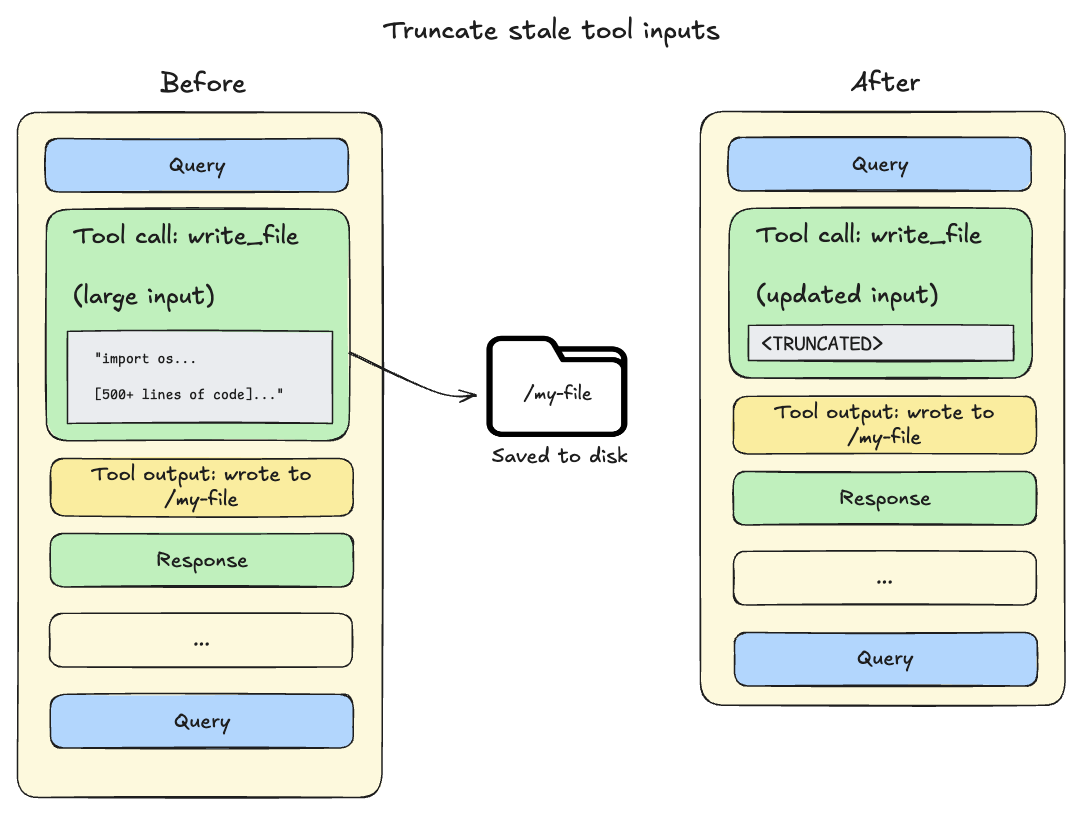
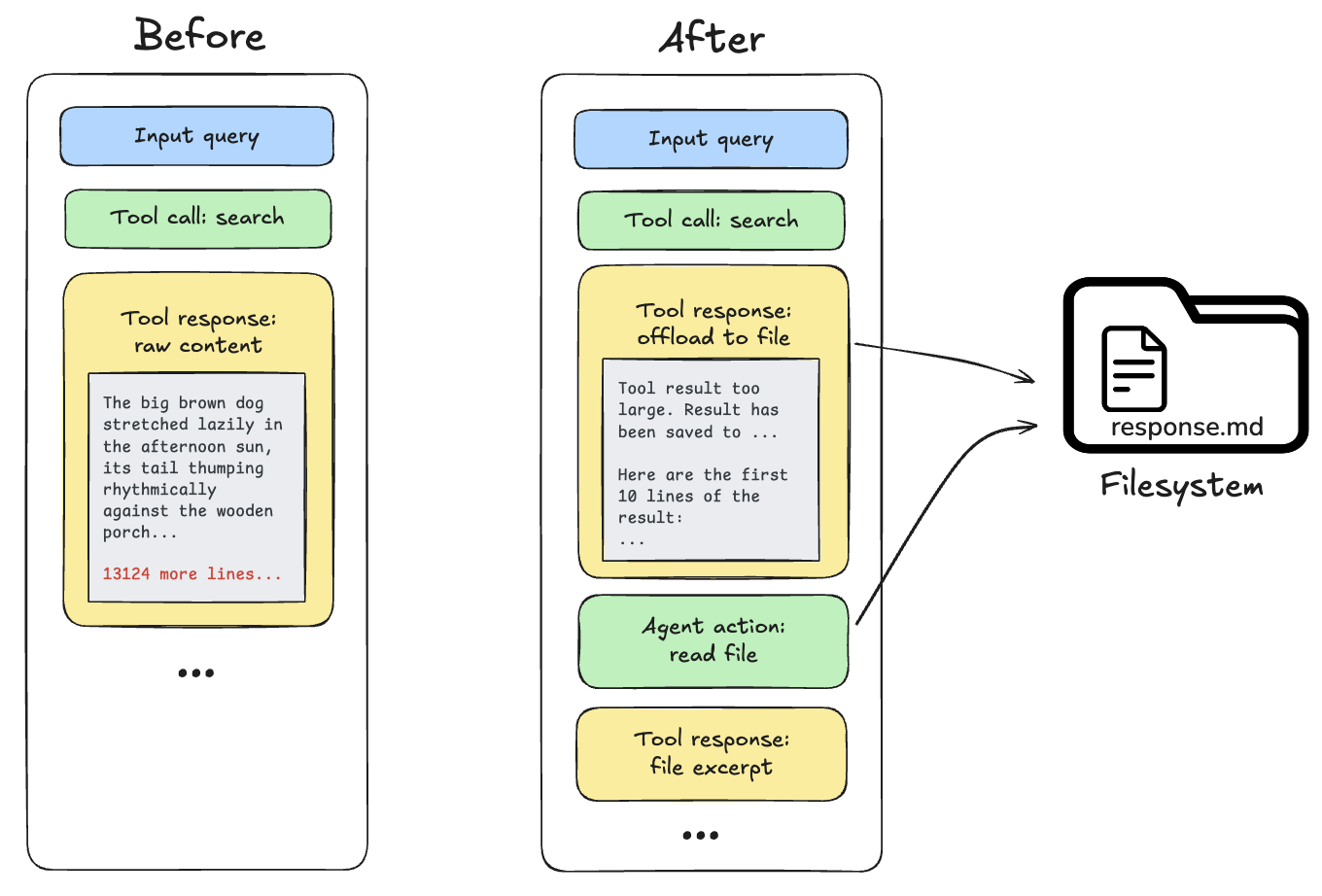
Deep Agents use the built-in filesystem tools to automatically offload content and to search and retrieve that offloaded content as needed. Content offloading happens when tool call inputs or results exceed a token threshold (default 20,000):
Tool call inputs exceed 20,000 tokens: File write and edit operations leave behind tool calls containing the complete file content in the agent's conversation history. Since this content is already persisted to the filesystem, it's often redundant. As the session context crosses 85% of the model's available window, deep agents truncate older tool calls, replacing them with a pointer to the file on disk and reducing the size of the active context.
Tool call results exceed 20,000 tokens: When this occurs, the deep agent offloads the response to the configured backend and substitutes it with a file path reference and a preview of the first 10 lines. Agents can then re-read or search the content as needed.
NOTE
Built-in context compression does not resize images, lower image resolution, or generate visual embeddings. For multimodal inputs, tool outputs, and how compression interacts with media, see Multimodal.
Summarization
NOTE
The current summarization behavior (in-model summarization via wrapModelCall, accurate token counting, and automatic ContextOverflowError fallback) requires deepagents>=1.6.0.
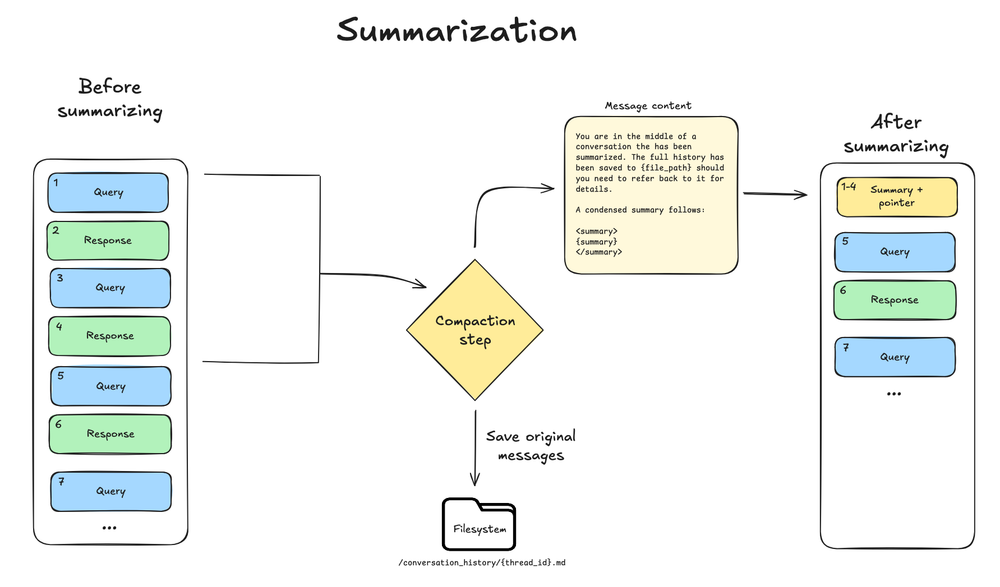
Every create_deep_agent call includes SummarizationMiddleware in the bare stack. When the context size crosses the model's context window limit (for example 85% of max_input_tokens), and there is no more context eligible for offloading, the deep agent summarizes the message history automatically.
This process has two components:
- In-context summary: An LLM generates a structured summary of the conversation including session intent, artifacts created, and next steps—which replaces the full conversation history in the agent's working memory.
- Filesystem preservation: A text rendering of the original conversation messages is written to the filesystem as a canonical record.
This dual approach ensures the agent maintains awareness of its goals and progress (via the summary) while preserving the ability to recover text details when needed (via filesystem search).
Configuration:
- Triggers at 85% of the model's
max_input_tokensfrom its model profile - Keeps 10% of tokens as recent context
- Falls back to 170,000-token trigger / 6 messages kept if model profile is unavailable
- If any model call raises a standard ContextOverflowError, the deep agent immediately falls back to summarization and retry with summary + recent preserved messages
- Older messages are summarized by the model
TIP
Streaming tokens from the agent will generally include tokens generated by the summarization step. You can filter out these tokens using their associated metadata:
> for await (const [message, metadata] of await agent.stream(
>   { messages: [...] },
>   { streamMode: "messages" },
> )) {
>   if (metadata?.lcSource === "summarization") {
>     continue;
>   } else {
>     ...
>   }
> }
> ```

## Context isolation with subagents

Subagents solve the **context bloat problem**. When the main agent uses tools with large outputs (web search, file reads, database queries), the context window fills quickly. Subagents isolate this work—the main agent receives only the final result, not the dozens of tool calls that produced it. You can also configure each subagent separately from the main agent (for example, model, tools, system prompt, and skills).

**How it works:**

* Main agent has a `task` tool to delegate work
* Subagent runs with its own fresh context
* Subagent executes autonomously until completion
* Subagent returns a single final report to the main agent
* Main agent's context stays clean

**Best practices:**

1. **Delegate complex tasks**: Use subagents for multi-step work that would clutter the main agent's context.

2. **Keep subagent responses concise**: Instruct subagents to return summaries, not raw data:


```ts theme={"theme":{"light":"catppuccin-latte","dark":"catppuccin-mocha"}}
   const researchSubagent = {
     name: "researcher",
     description: "Conducts research on a topic",
     systemPrompt: `You are a research assistant.
       IMPORTANT: Return only the essential summary (under 500 words).
       Do NOT include raw search results or detailed tool outputs.`,
     tools: [webSearch],
};Open a public LangSmith run for this example.
- Use the filesystem for large data: Subagents can write results to files; the main agent reads what it needs.
See Subagents for configuration and context management for runtime context propagation and per-subagent namespacing.
Long-term memory
When using the default filesystem, your deep agent stores its working memory files in agent state, which only persists within a single thread. Long-term memory enables your deep agent to persist information across different threads and conversations. Deep agents can use long-term memory for storing user preferences, accumulated knowledge, research progress, or any information that should persist beyond a single session.
To use long-term memory, you must use a CompositeBackend that routes specific paths (typically /memories/) to a LangGraph Store, which provides durable cross-thread persistence. The CompositeBackend is a hybrid storage system where some files persist indefinitely while others remain scoped to a single thread.
import {
  CompositeBackend,
  createDeepAgent,
  StateBackend,
  StoreBackend,
} from "deepagents";
import { InMemoryStore } from "@langchain/langgraph";

const agent = await createDeepAgent({
  model: "google:gemini-3.6-flash",
  store: new InMemoryStore(),
  backend: new CompositeBackend(new StateBackend(), {
    "/memories/": new StoreBackend({
      namespace: () => ["memories"],
    }),
  }),
  systemPrompt: `When users tell you their preferences, save them to /memories/user_preferences.txt so you remember them in future conversations.`,
});import {
CompositeBackend,
createDeepAgent,
StateBackend,
StoreBackend,
} from "deepagents";
import { InMemoryStore } from "@langchain/langgraph";
const agent = await createDeepAgent({
model: "openai:gpt-5.5",
store: new InMemoryStore(),
backend: new CompositeBackend(new StateBackend(), {
"/memories/": new StoreBackend({
namespace: () => ["memories"],
}),
}),
systemPrompt: `When users tell you their preferences, save them to /memories/user_preferences.txt so you remember them in future conversations.`,
});import {
CompositeBackend,
createDeepAgent,
StateBackend,
StoreBackend,
} from "deepagents";
import { InMemoryStore } from "@langchain/langgraph";
const agent = await createDeepAgent({
model: "anthropic:claude-sonnet-5",
store: new InMemoryStore(),
backend: new CompositeBackend(new StateBackend(), {
"/memories/": new StoreBackend({
namespace: () => ["memories"],
}),
}),
systemPrompt: `When users tell you their preferences, save them to /memories/user_preferences.txt so you remember them in future conversations.`,
});import {
CompositeBackend,
createDeepAgent,
StateBackend,
StoreBackend,
} from "deepagents";
import { InMemoryStore } from "@langchain/langgraph";
const agent = await createDeepAgent({
model: "openrouter:z-ai/glm-5.2",
store: new InMemoryStore(),
backend: new CompositeBackend(new StateBackend(), {
"/memories/": new StoreBackend({
namespace: () => ["memories"],
}),
}),
systemPrompt: `When users tell you their preferences, save them to /memories/user_preferences.txt so you remember them in future conversations.`,
});import {
CompositeBackend,
createDeepAgent,
StateBackend,
StoreBackend,
} from "deepagents";
import { InMemoryStore } from "@langchain/langgraph";
const agent = await createDeepAgent({
model: "fireworks:accounts/fireworks/models/glm-5p2",
store: new InMemoryStore(),
backend: new CompositeBackend(new StateBackend(), {
"/memories/": new StoreBackend({
namespace: () => ["memories"],
}),
}),
systemPrompt: `When users tell you their preferences, save them to /memories/user_preferences.txt so you remember them in future conversations.`,
});import {
CompositeBackend,
createDeepAgent,
StateBackend,
StoreBackend,
} from "deepagents";
import { InMemoryStore } from "@langchain/langgraph";
const agent = await createDeepAgent({
model: "baseten:zai-org/GLM-5.2",
store: new InMemoryStore(),
backend: new CompositeBackend(new StateBackend(), {
"/memories/": new StoreBackend({
namespace: () => ["memories"],
}),
}),
systemPrompt: `When users tell you their preferences, save them to /memories/user_preferences.txt so you remember them in future conversations.`,
});import {
CompositeBackend,
createDeepAgent,
StateBackend,
StoreBackend,
} from "deepagents";
import { InMemoryStore } from "@langchain/langgraph";
const agent = await createDeepAgent({
model: "ollama:north-mini-code-1.0",
store: new InMemoryStore(),
backend: new CompositeBackend(new StateBackend(), {
"/memories/": new StoreBackend({
namespace: () => ["memories"],
}),
}),
systemPrompt: `When users tell you their preferences, save them to /memories/user_preferences.txt so you remember them in future conversations.`,
});Open a public LangSmith run for this example.
You do not need to pre-populate /memories/ with files. You provide the backend config, store, and system prompt instructions that tell the agent what to save and where. For example, you may prompt the agent to store preferences in /memories/preferences.txt. The path starts empty and the agent creates files on demand using its filesystem tools (write_file, edit_file) when users share information worth remembering.
To pre-seed memories, use the Store API when deploying on LangSmith. See Long-term memory for setup and use cases.
Best practices
- Start with the right input context: Keep memory minimal for always-relevant conventions; use focused skills for task-specific capabilities.
- Leverage subagents for heavy work: Delegate multi-step, output-heavy tasks to keep the main agent's context clean.
- Adjust subagent outputs in configuration: If you notice when debugging that subagents generate long output, you can add guidance to the subagent's
system_promptto create summaries and synthesized findings. - Use the filesystem: Persist large outputs to files (for example subagent writes or automatic offloading) so the active context stays small; the model can pull in fragments with
read_fileandgrepwhen it needs details. - Document long-term memory structure: Tell the agent what lives in
/memories/and how to use it. - Pass runtime context for tools: Use
contextfor user metadata, API keys, and other static configuration that tools need.
Related resources
- Harness: Context management overview, offloading, summarization
- Multimodal: images, audio, video, and multimodal tool outputs
- Subagents: Context isolation, runtime context propagation
- Long-term memory: Cross-thread persistence
- OpenWiki: Repository wikis that coding agents find through
AGENTS.md
- OpenWiki: Repository wikis that coding agents find through
- Skills: Progressive disclosure and skill authoring
- Backends: Filesystem backends and CompositeBackend
- Context conceptual overview: Context types and lifecycle
Connect these docs to your agent of choice via MCP for real-time answers.